VAS Feed Comp
The building of VAS’s Feed Management Tool
to ensure effective feeding operations at the farm.

The Project at a Glance
Project Type
End-to End Product Design
for VAS’s FeedNext (Now, FeedComp)
Project Duration
2 months
Contribution, Methods and Tools
User Research, Stakeholder Interviews, Usability Studies
Hi Fidelity Designs, Clickable Prototype, Figma
Role
UX Designer
Project Status
Successfully Rolled Out
Outcome
Decreased Time at task by 90%
Increased Customer Satisfaction by 94%
As part of my commitment to client confidentiality, I’ve carefully modified certain details in this case study to comply with our non-disclosure agreement (NDA). This overview focuses only on the high-level research and design process while ensuring all proprietary information remains secure.
B A C K G R O U N D
The Context
VAS, a US based global leader in connected farm management, serves over 15 million animals in 100+ countries. Recognizing that feeding operations accounts for 50-60% of dairy farm costs, VAS saw the need for a robust feed management system.
The system helps users manage the entire feed cycle, from scheduling feedings- recipe selection and mixing ingredients, to delivering the prepared mix to assigned pens, and monitoring feed performance. The system would also include additional important operations tasks like making adjustments to the cattle pens, ingredients, locations and equipments and tracking inventory. Via a mobile app, farms can capture precise data, generate reports, track trends, and optimize feeding decisions.
Make adjustments
to Pens, Ingredients, Recipes, Inventories,
Vendors, Locations, etc
Prepare a Feeding Schedule
Feeding Process
Mix the ingredients as per a recipe according to a feeding schedule
Drop the prepared mix into pens according to the feeding schedule
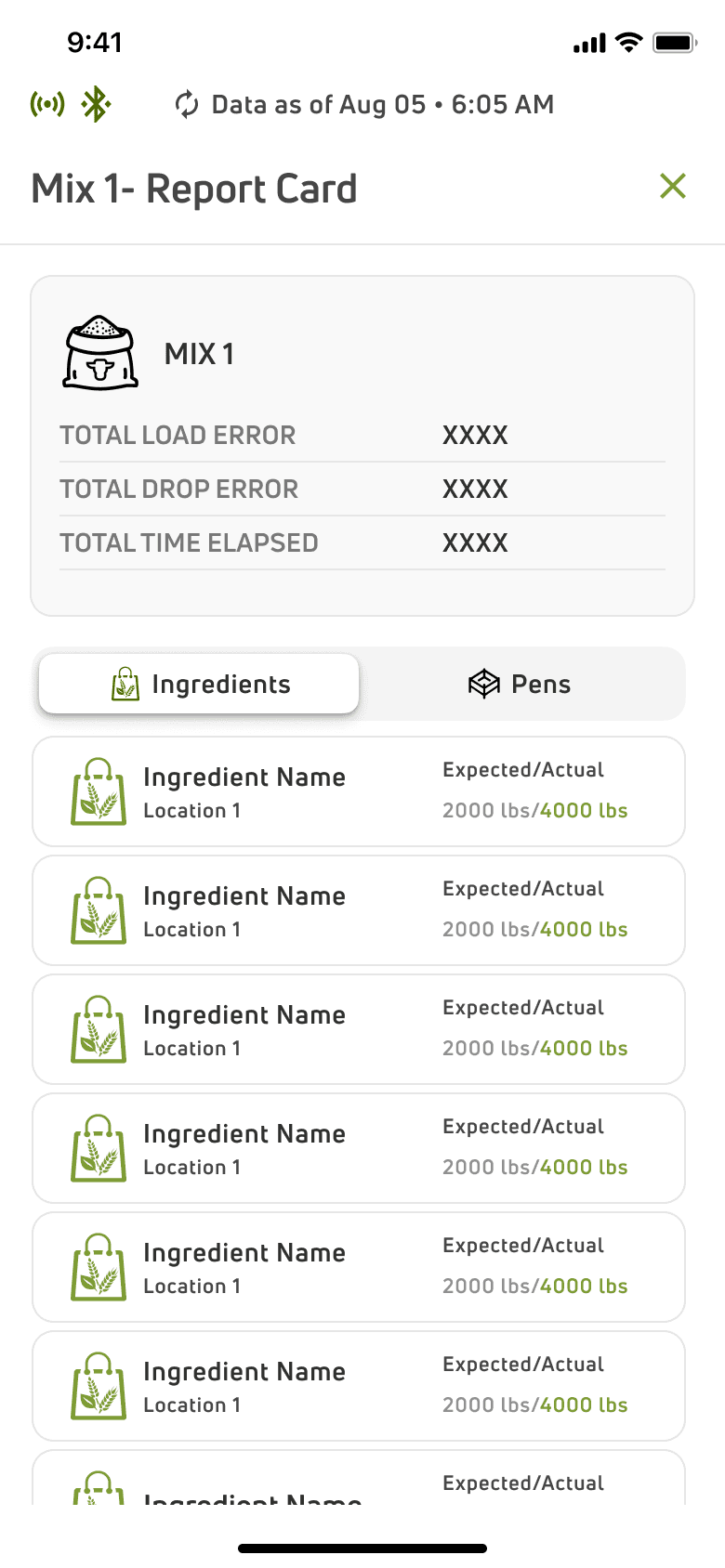
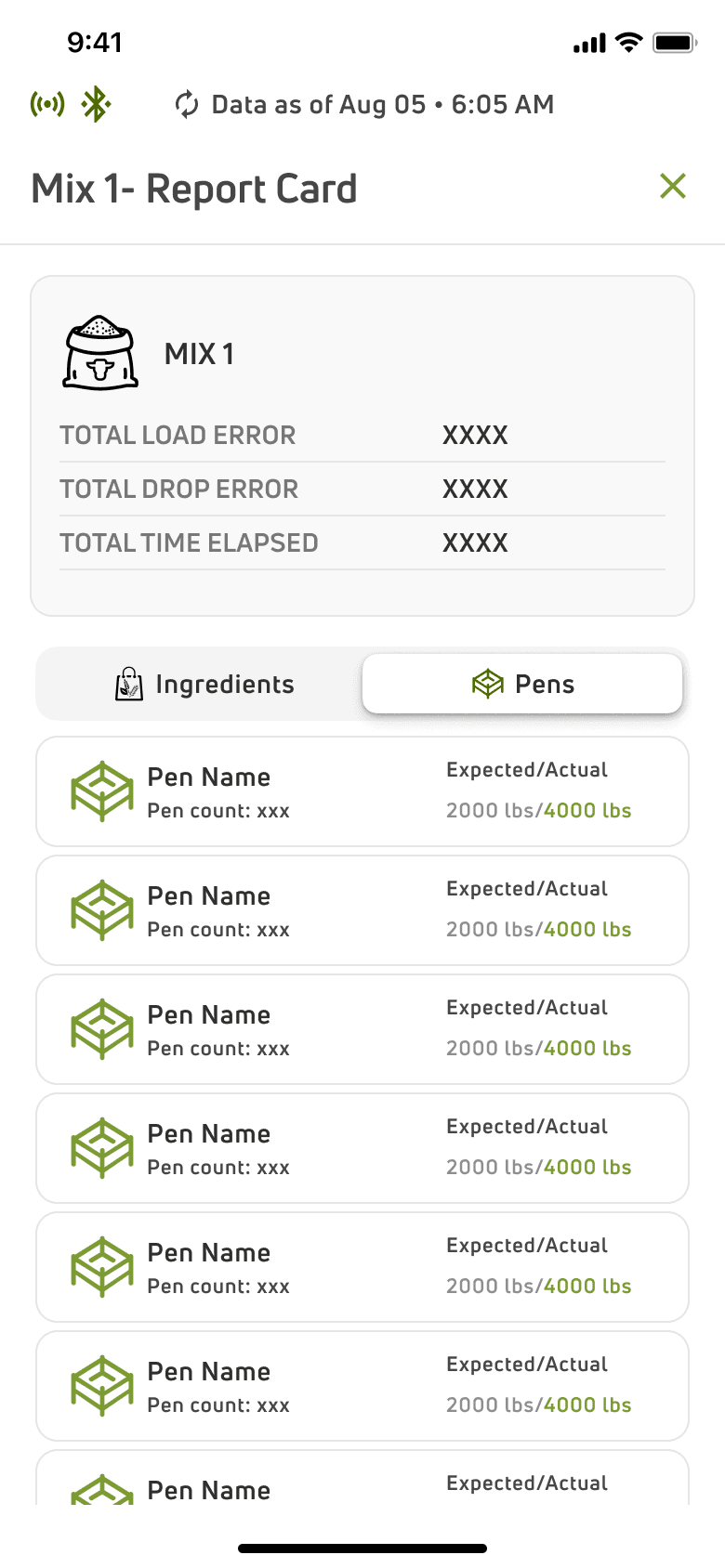
Prepare a Report Card
Report based on the Feed Performance
My Role
As a UX designer in a team of two, I led the design efforts for this project, delivering designs and prototypes within a two-month timeframe. I played a pivotal role in conducting research, developed solutions, and collaborated with product managers, analysts, developers, and clients. Regular reviews ensured our solutions were effective and user-centric.
T H E R O A D M A P
Process Highlights
We began by analyzing business requirements and conducting research. Following the Human-Centered Design process, we used insights to guide our solutions. Weekly reviews with clients and usability studies with end users helped us iterate and refine the application.
Empathize
Define
Ideate
Solution
Research
Analyse Insights and define the problem
Brainstorm
Develop Proposals
Get feedback
Iterate
Testing and
Iterations
K I C K O F F
Identifying the Users
Before diving into the users' challenges, we first identified the key personas who would be using our application. This approach allowed us to gain a deeper understanding of their needs and to formulate the most relevant questions for our user research.
Feed Supervisor
Feeder
Nutritionist
Talking to the Users
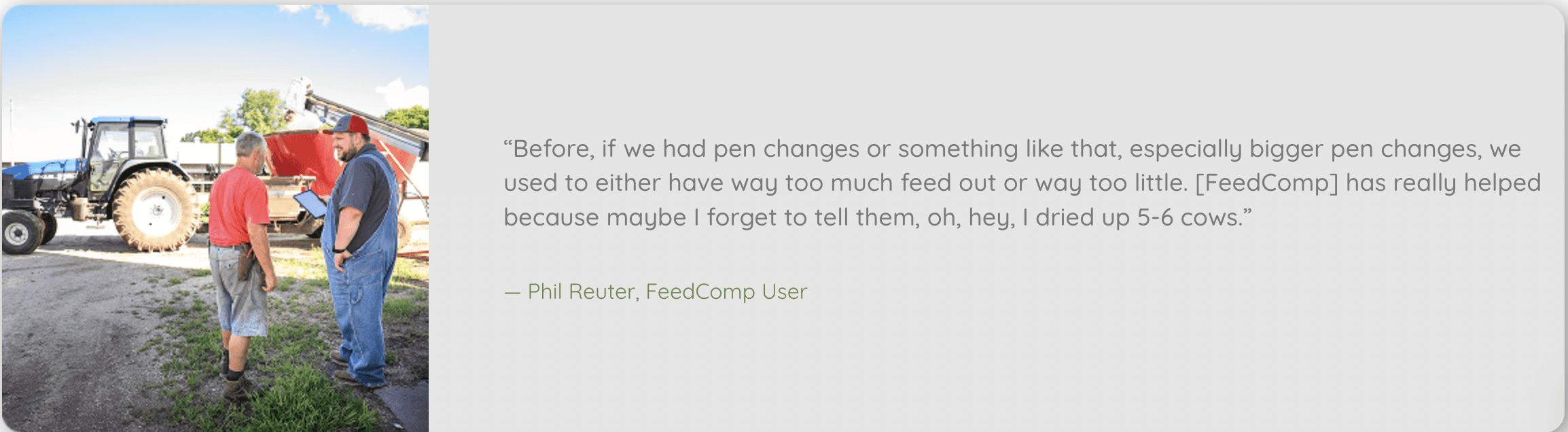
To ensure that the application was designed with real user needs in mind, we conducted online user interviews with farm owners, feed supervisors, and feeders and nutritionists. We conducted 5 user interviews online to better get and understanding of the pain points of our user base. These sessions helped us understand their daily challenges, workflows, and expectations from a feed management system. The insights gathered played a crucial role in shaping the product’s usability, ensuring that it was intuitive, efficient, and aligned with how farms operate.
Tracking feed inventory has always been a challenge. Sometimes we overstock, sometimes we run out, and there’s no easy way to monitor it in real-time. A system that alerts us when stock is low would be a game-changer."
-A Feed Supervisor
English isn’t my first language, and I don’t have time to figure things out. If the app can guide me visually or in Spanish, that would help me do my job faster without asking for help all the time.”
-A Feeder
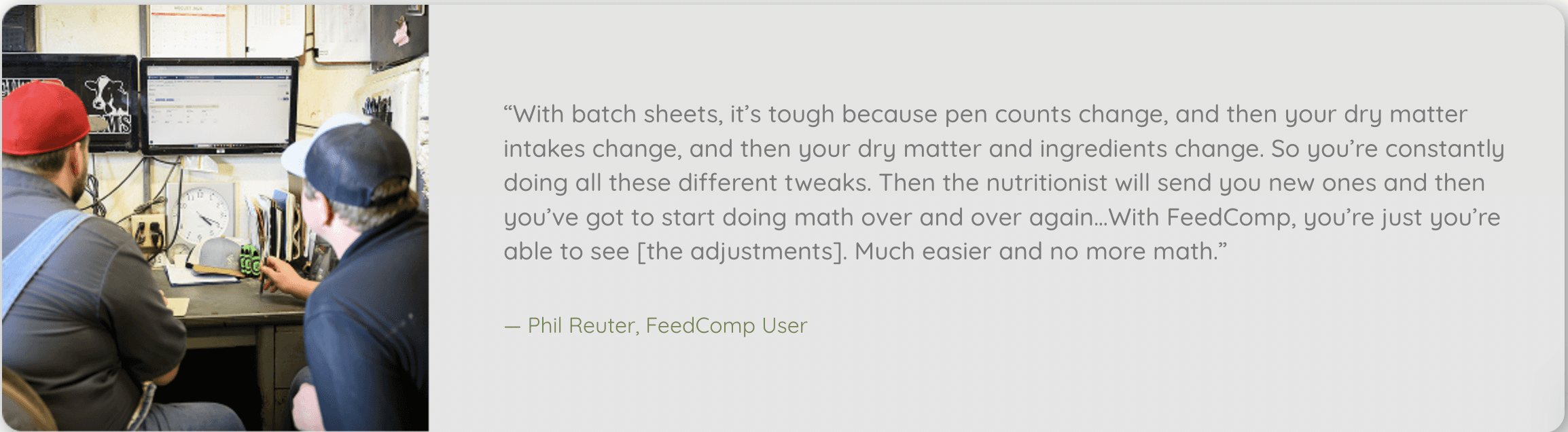
I have very little time to train new employees. If the system is too complex, they’ll keep making mistakes. We need something simple—just a few taps to create a recipe and schedule feed drops.”
-A Feed Supervisor
Understanding the Users
Persona: Feed Supervisor
As a farm supervisor, they continually monitor the efficiency of feeding cows (The cost of ingredients, how long it takes to feed animals, and when they should be fed).
Pain Points:
They struggle with inventory management- either running out of or overstocking without accurate data.
They are often rushed and have minimal time.
They have to monitor feed rations and adjust amounts to ensure effective feeding which is very time consuming without a proper tool.
Goals:
To have a tool to effectively manage feed inventory, feed costs and feeding schedules.
An easy tool to make adjustments to pens, recipes, locations and ingredients as and when required.
A system that requires little input on training new employees and is easy and intuitive.
Persona: Feeder
For a feeder their primary responsibility is to ensure that the dairy cows are fed according to the
schedules and rations set by the farm owner or feed supervisor. They also need to take into account variations that might ultimately affect how much feed should be mixed and delivered to the cows.
Pain Points:
They are mostly Spanish Speaking and have trouble interpreting tools in other languages.
They are often not very educated and have trouble using complex systems. Additionally, They are groggy and rushed early in the morning while feeding
They have to ensure accurate feedings to the pens. Currently they do this manually.
Goals:
They need an easy to use application to ensure accurate feedings, mixing and dropping into the pens while making sure the scales and equipment are updated.
They need the application to run autonomously once connected.
They need the application to have multi-lingual support.
Persona: Nutritionist
A nutritionist helps dairy owners ensuring the optimal health of their herd. Their primary responsibility is
formulating diets and recipes by balancing a complex mix of ingredients to support healthy feeding of the cows.
Pain Points:
Since the current process of recipe creation is manual, it it error prone and often cause huge loss on costs.
They often work out of the farm so they don’t always get accurate data of the ingredients and inventory or are able to track them in real time.
Goals:
They need an application where they can track all ingredients and their costs.
They need an effective and simpler way to . create recipes for the feed as per nutritious value as well keep costs in check.
Understanding the Farm Operations
The setup used within the farm for mixing and dropping is that of a Mobile Mixer:
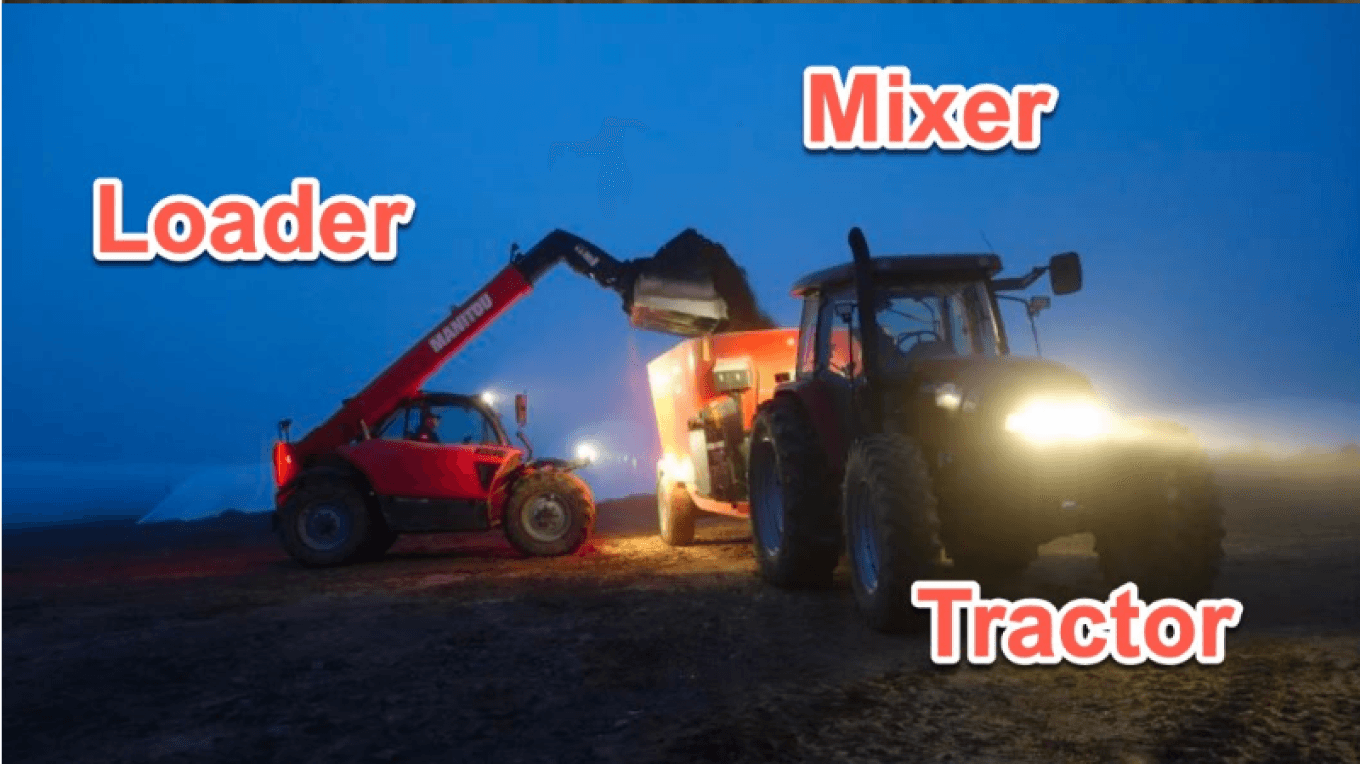
The mixer has a truck/tractor with a mixer unit attached. A loader brings the ingredients from a certain location and will drop the ingredients into this mixing unit according to the pre defined recipe in a certain proportion.
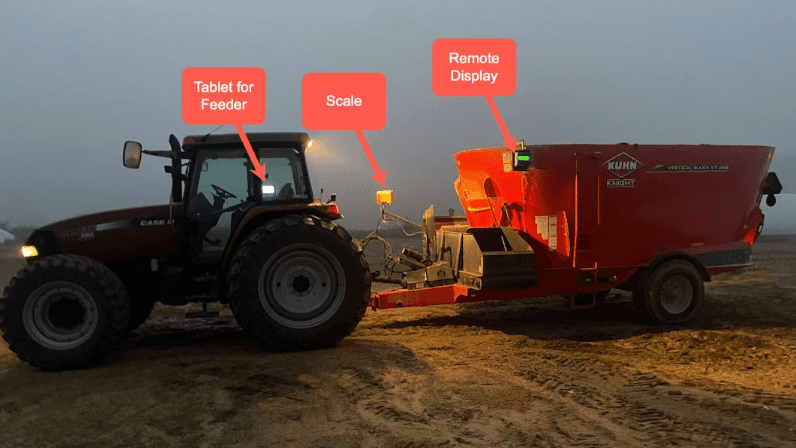
Now as the ingredients are drop inside this mixer, the scale device which is mounted on this particular mixer will register the weight of the quantity of the ingredients that is been dropped in this mixer.
Attached in the tractor is a mobile device that will actually help execute this entire process.
Competitive Analysis
We did a comprehensive competitive study to identify where our product stood in the market and identify the areas of opportunity for our application in a competitive context and analyzed applications like Onefeed and MicroTechnologies. Although the details of the competitive analysis can not be shared due to confidentiality, but after the analysis, we mapped out a SWOT chart for our application.
Established industry Expertize.
Strong Data Capabilities and integration possibilities due to existing herd management system.
Strengths
Limited Digital Infrastructure on Farms.
High learning curve for feeders
Extensive research for scalable and adaptible solutions
Weaknesses
Mobile First Approach
Multilingual Support
Connectivity capabilities.
Opportunities
Hardware Integration challenges
Resistance to change from the current manual workflow.
Threats
Understanding the Business Requirements
Some of the key business requirements were:
Core Feed Management Features
Creating, editing, and deleting Ingredients, Recipes, Pens, Locations, Equipments, Feedings, Users, etc.
Communication with a scale
Communication with a scale over a wireless connection via bluetooth.
Report Generation
Report cards on Feedings, Feed Errors, Feeding History, etc.
Inventory Management
Manage a robust ingredient-location and vendor roster to track items running out, place orders, etc.
PROBLEM STATEMENT
Defining the Problem
Based on the identified pain points, we chalked out the problem that we needed to solve-
How might we create a simple and intuitive feed management system for users to reduce manual effort and errors while increasing efficiency in feeding operations?
IDEATION
Design Proposals
We defined the design proposals based on the identified pain points:
Rushed and
minimal settings
Time Consuming
Feed operations
Groggy especially in the morning
Current process is manual and lead to inefficiencies.
Struggle with
inventory management
Mostly
Spanish
Speaking
Current process is error prone and innacurate
Not very educated and tech savvy
Multilingual Support
throughout
Use of visual
cues accoss
Timely alerts keep
users informed
Connectivity Status
Display
Prevention of
accidental taps
Efficient easy
to use tool
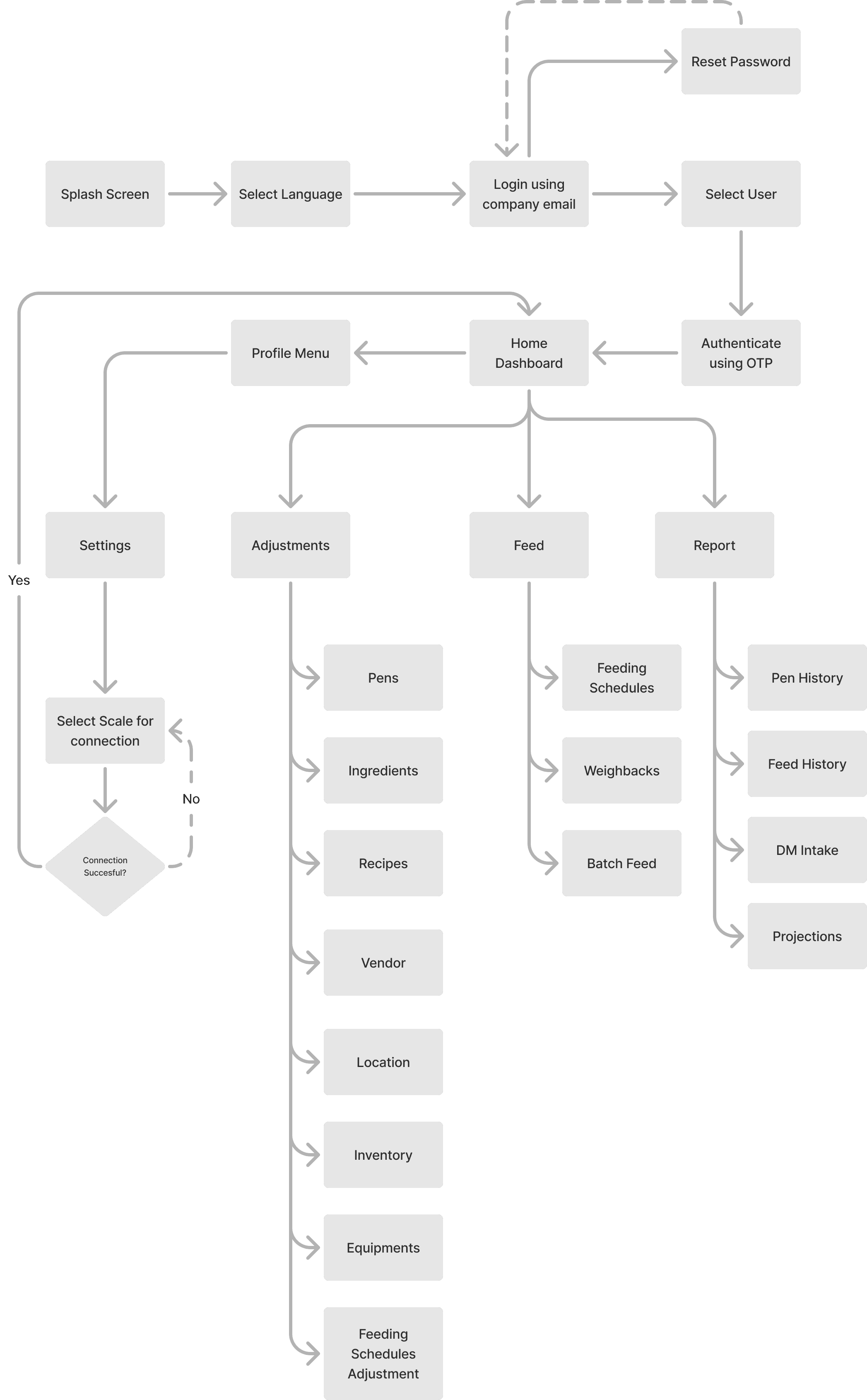
High Level Information Architecture
DESIGN SOLUTIONS
First Steps and Key Elements
We needed to make certain considerations based on the user pain points as a first. We had to be considerate about the fact that our user group wasn’t very tech savvy. They did not need complex layouts and flows. They were looking for as many elements that could decrease the cognitive overload for them.
Further, we began to design upon the VAS Design system based on the Material Design System and tailor it with the brand colours.
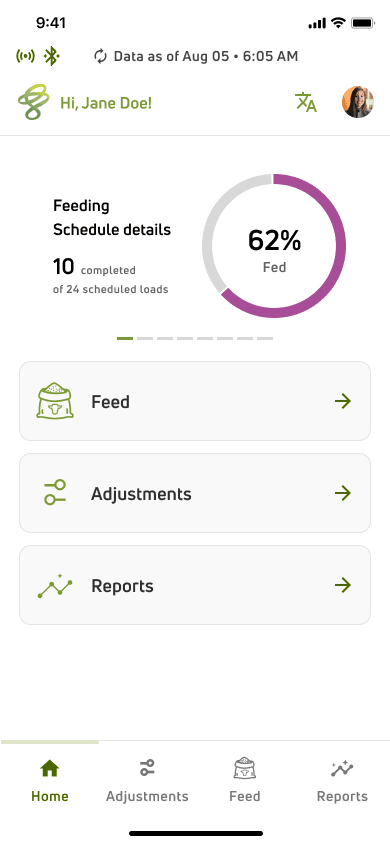
Carousel to display the Load details for Pen Types
Bottom Nav Bar for easy navigation
Extensive use of iconography throughout
the application to aid users visually
as the user group isn’t very well equipped
with mobile phones and technology in general
Top status bar to display last updated
data and connectivity status.
Cards allowing navigation to the
section of choice
Greeting Bar with easy navigation to profile and setting menu.
A mandatory translation icon on all the screens as necessary for the particular use case.
Adjustments- Basic Navigation
The Adjustments Dashboard allowed navigation to Pens, Ingredients, Recipes, Feeding Schedules, Equipment, Inventory and Locations. Within each of the sections, is a view experience equipped with search and filter features. The user can create/edit within these sections. While they cater to different needs, the navigation flow within each of these sections are similar so as to maintain consistency.
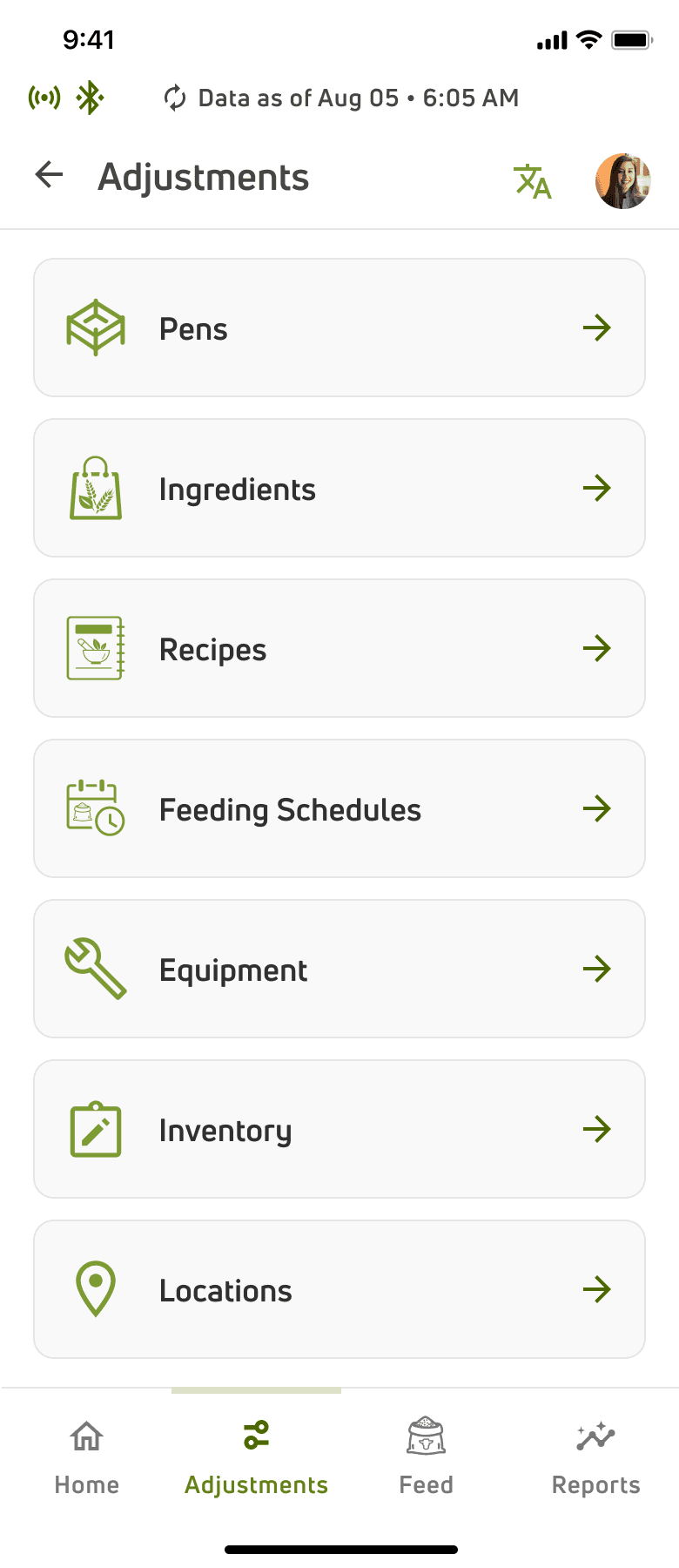
The list of crops/ingredients that are mixed as per a selected recipe to feed the cows.
An inventory to keep a track of ingredient
stocks.
The list of created feedings (Mix) and details
of which pen they’ll be fed to.
The list of recipes according to which
feedings are created by mixing ingredients.
The equipment, loader or mixer that is
being used in mixing/dropping the feedings.
Location within a farm to segregate
ingredients.
Pen is a fenced area where cows of different types are grouped together.
Efficient Adjustments Under Time Constraints
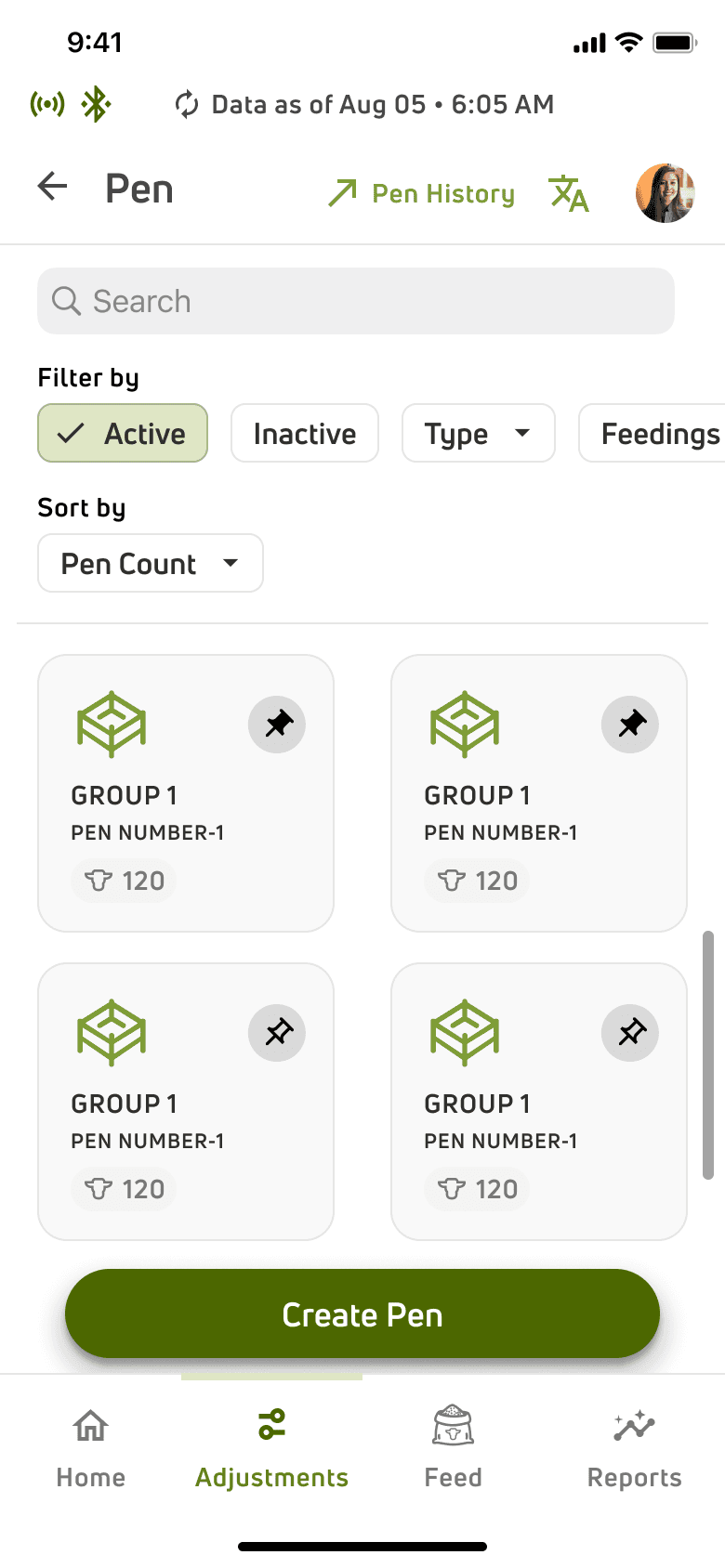
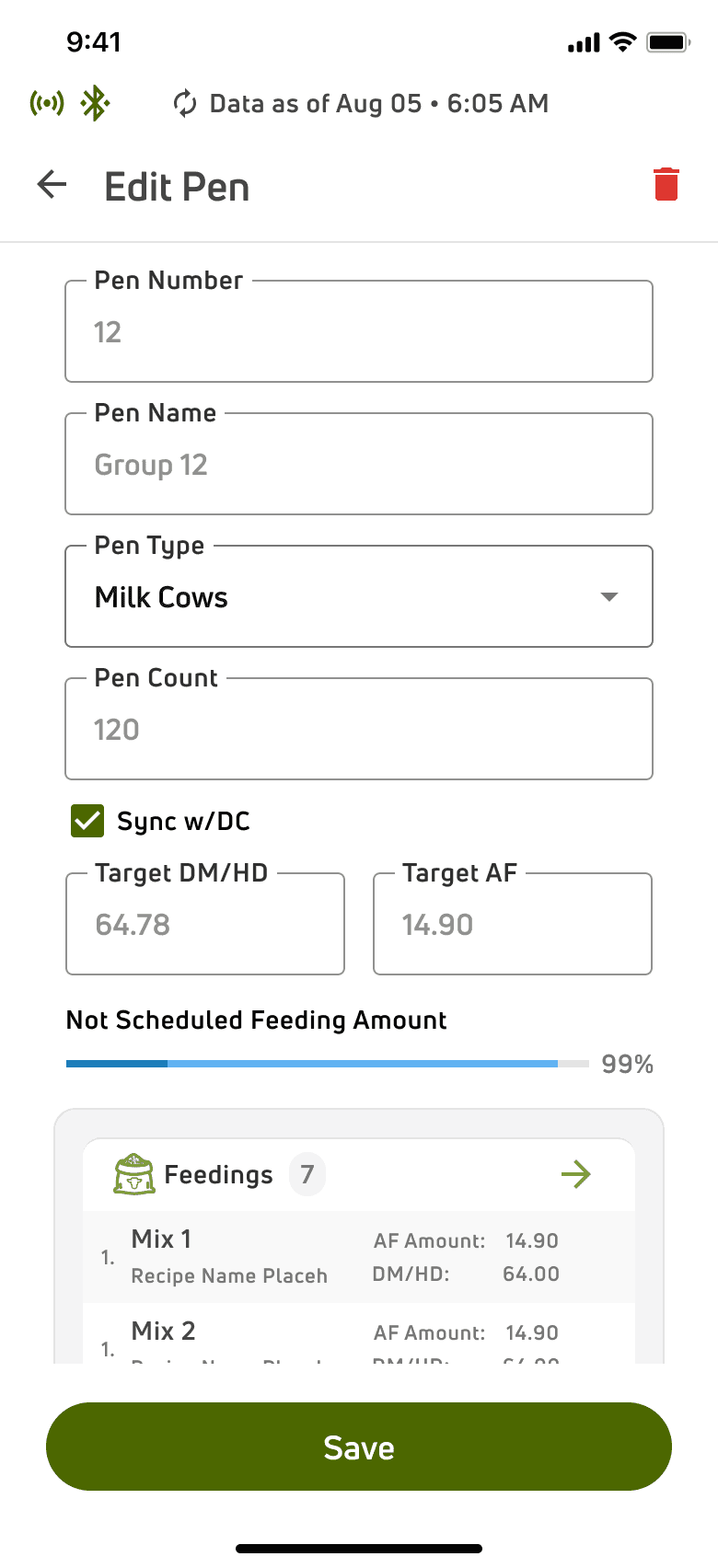
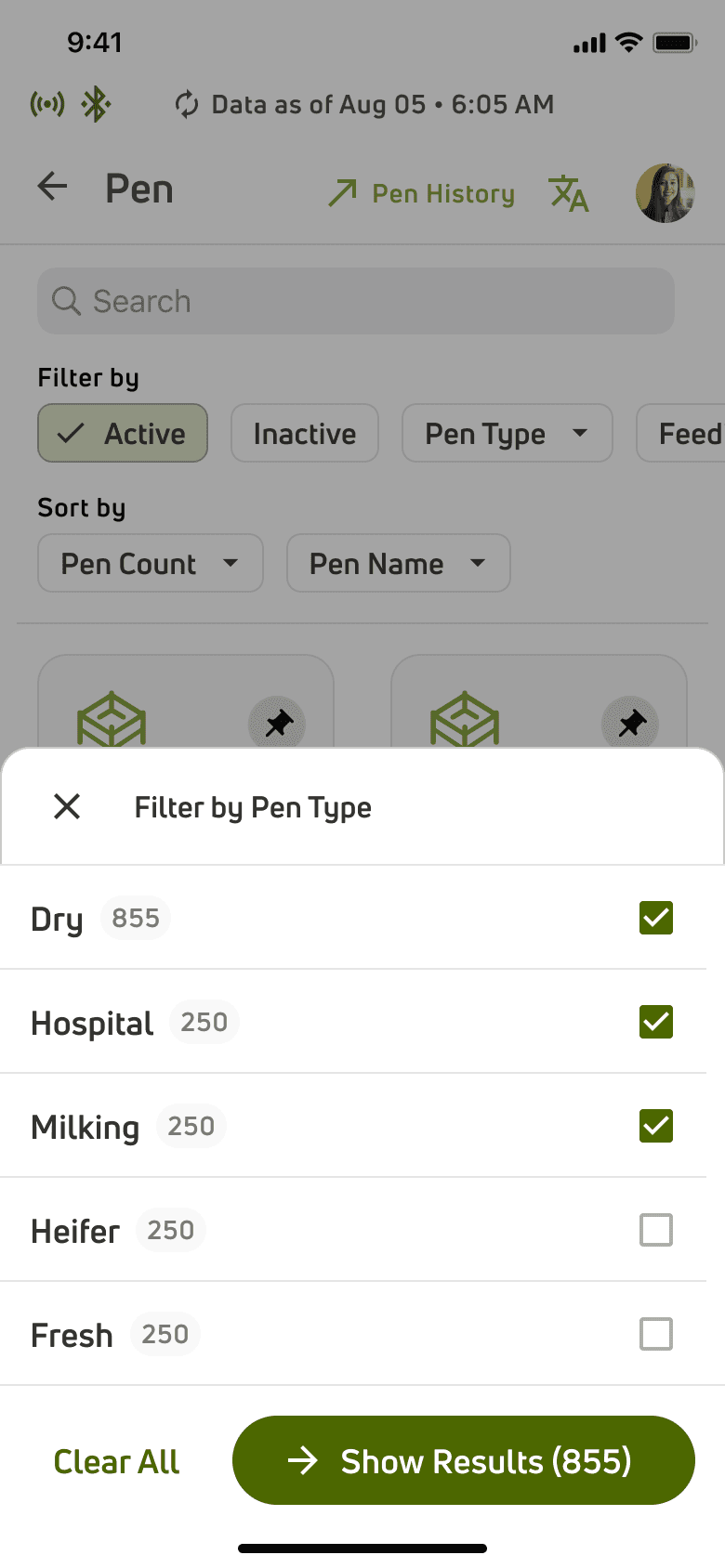
One of the major user problems is that they often work in rushed settings and want things handy so as to reduce time at task and cognitive load. To do this, robust search, filter and sorting mechanisms have been provided with an option to pin and quickly scan through items. A typical Adjustments flow allows creation, alteration and deletion.
A robust search mechanism supported by multiple filters and sort options
There is a pinning feature to pin a card of priority.
On clicking the card, the users are directed to a view-only page to view the details of the particular pen and feedings assigned to it.
The view only page avoids any accidental errors.
Closing the view only page
View Pen
Inactive Pens
Filters Sheet
Edit Pen
Create Pen
Pen Dashboard
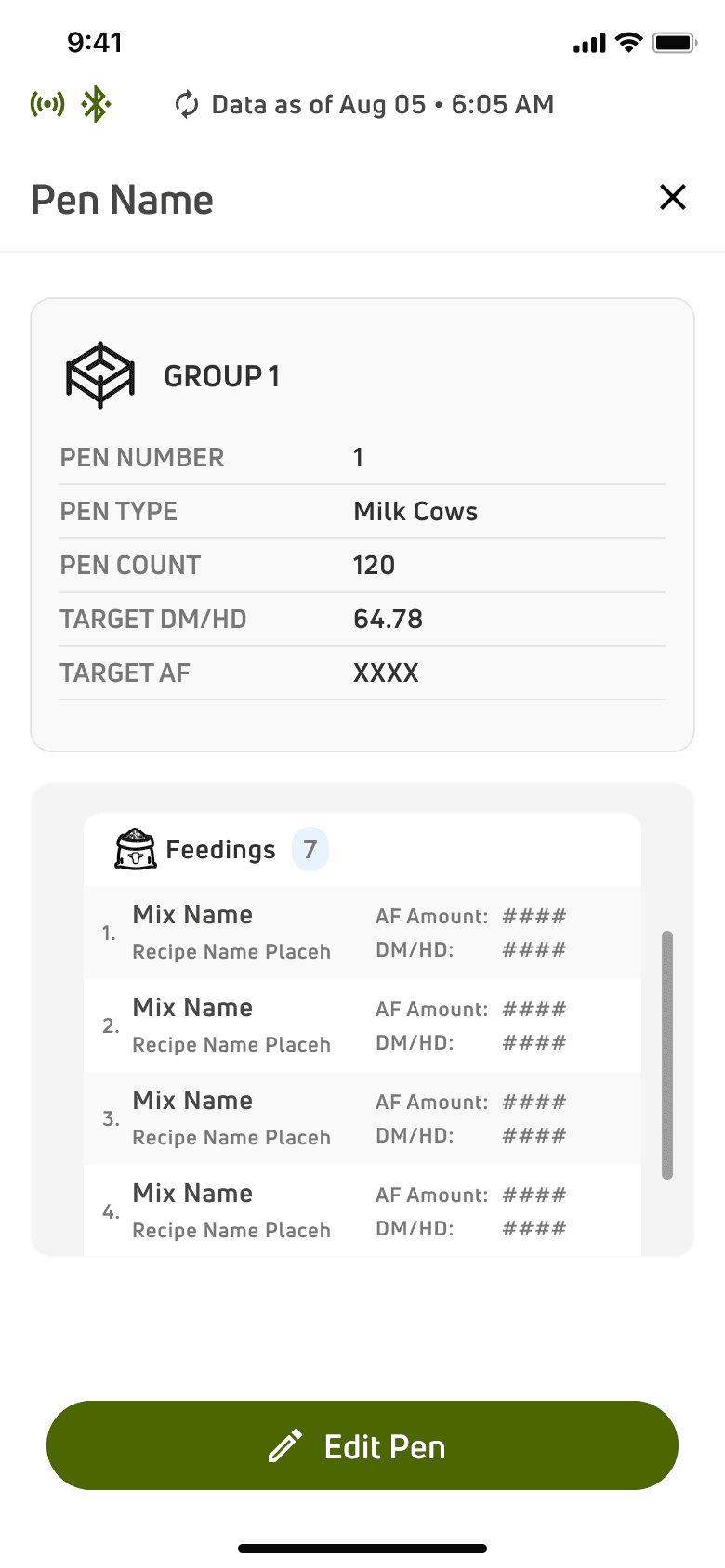
The option to view details of all the feedings assigned to this pen
The option to deactivate an item
The option to save the changes made
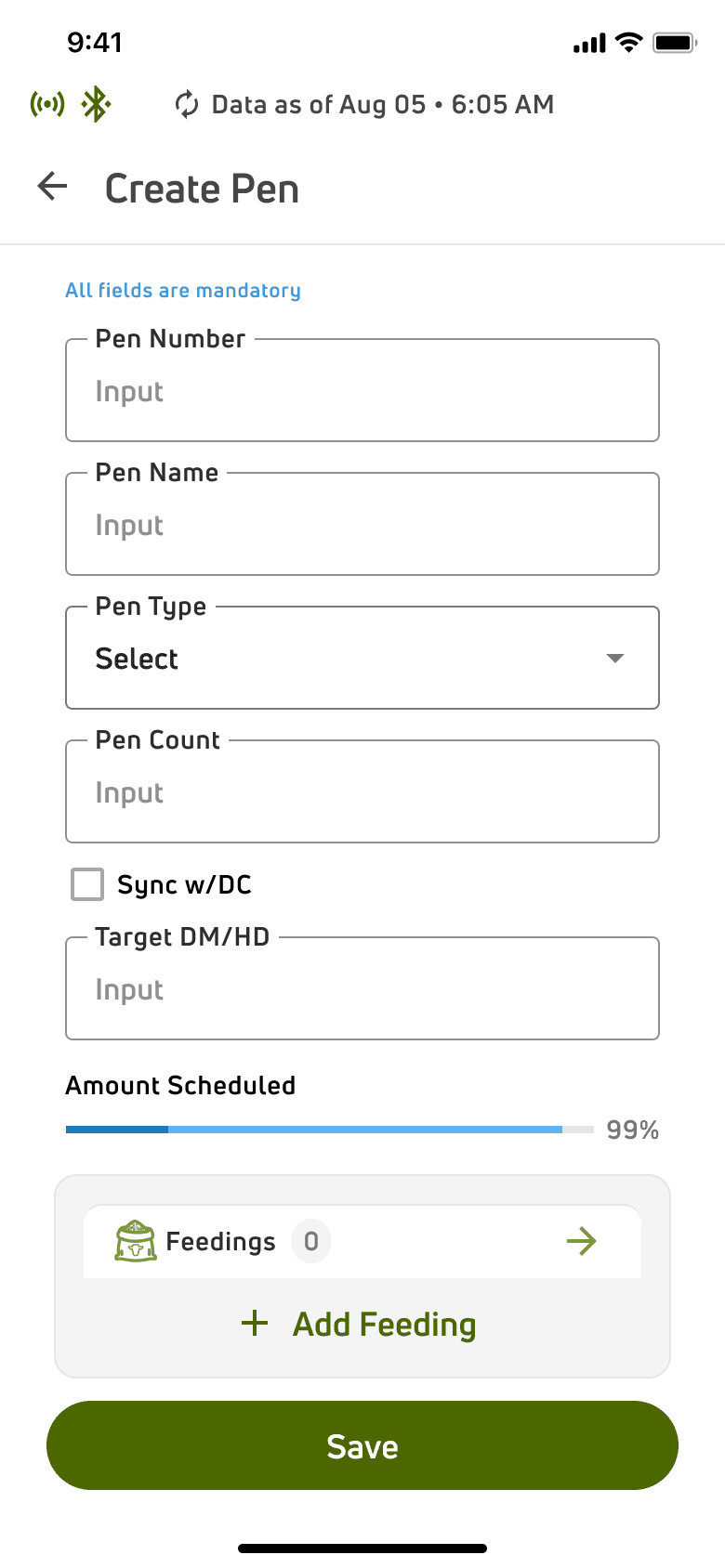
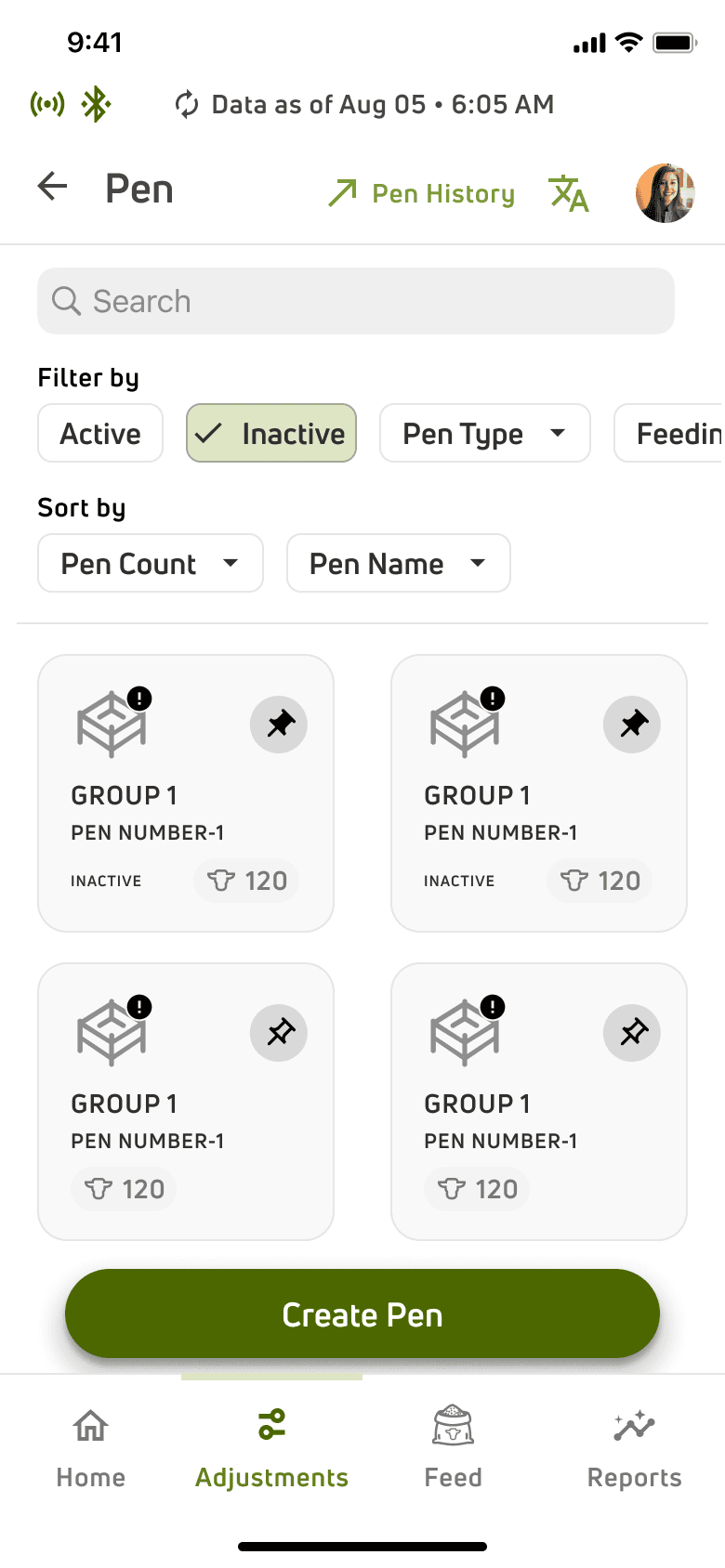
The iconography varies basis the status to create a clearer visual cue
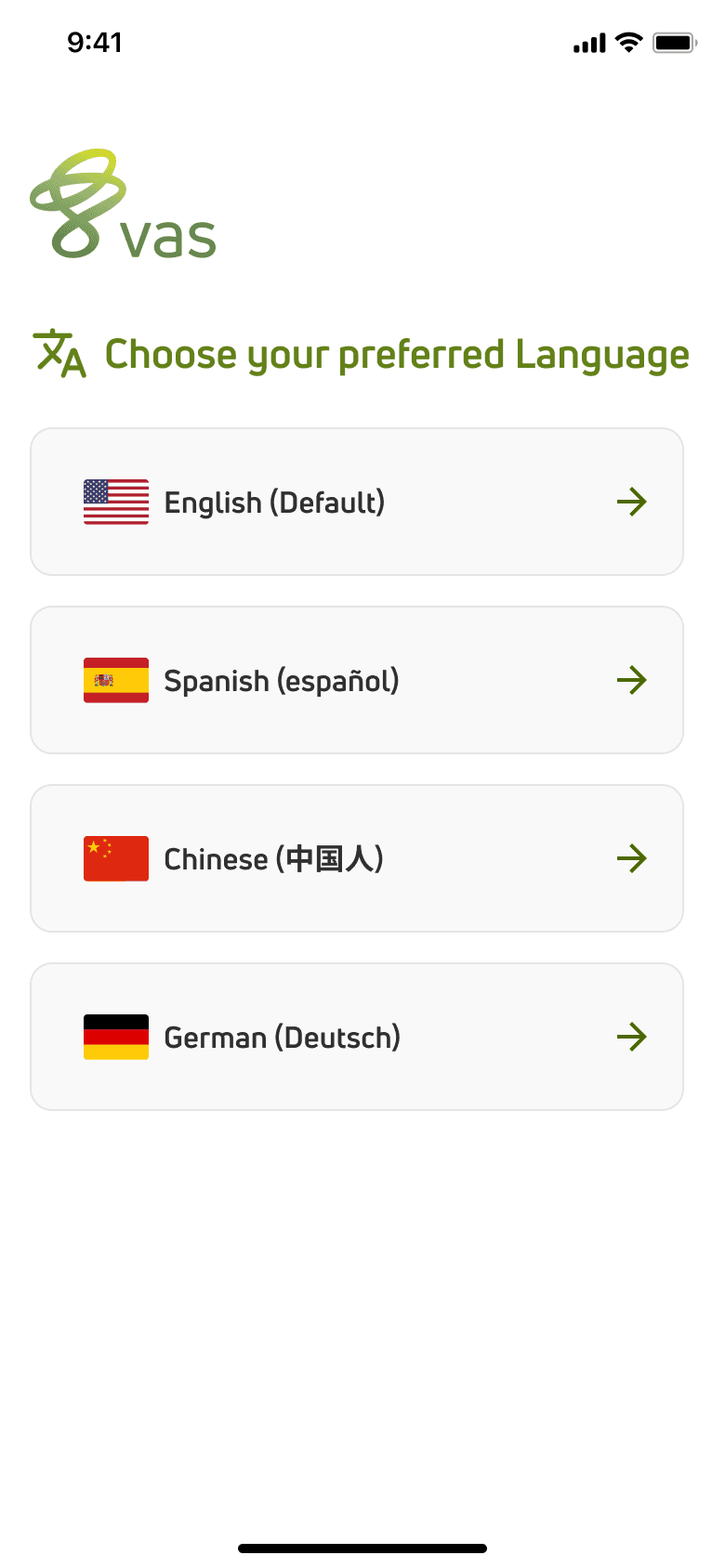
Comprehensive Multilingual Support Across the App
The users are mostly spanish speaking and need multilingual support within the application.
The option to choose a language during onboarding itself.
The option to change the language to a preferred language at any given point thought the app.

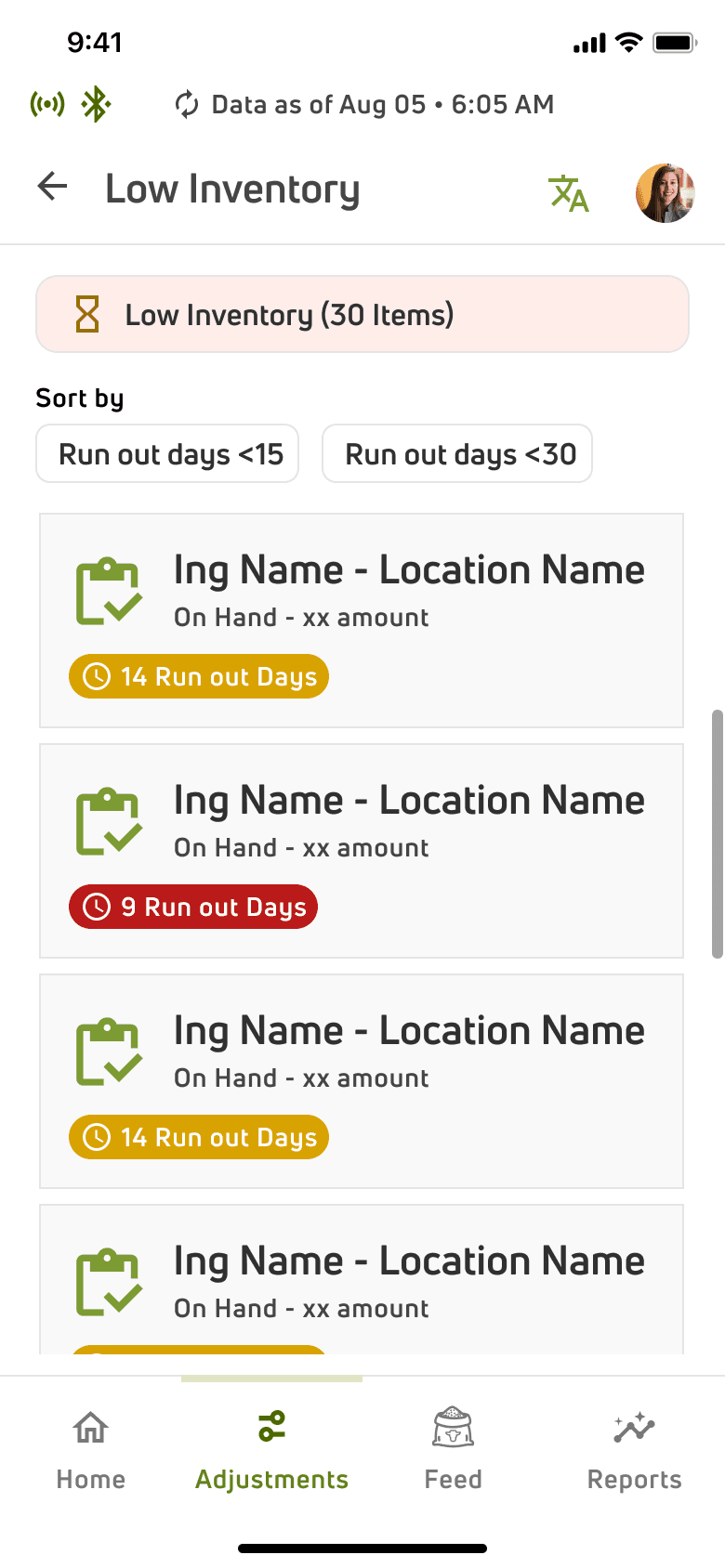
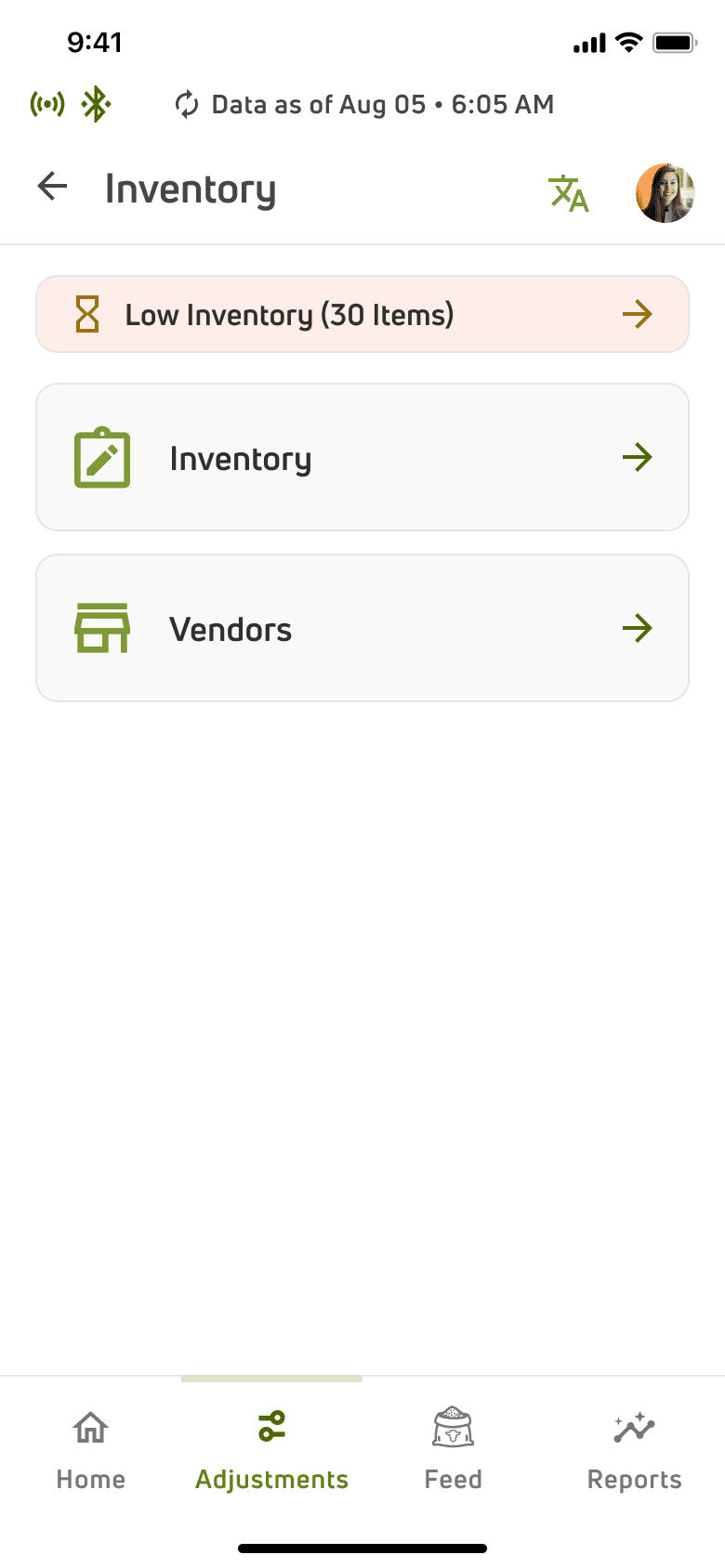
Low Inventory Alerts for Timely Re-stocking
One of the key pain points the users had was to keep track of inventory items. While manually checking it could create errors, regular updates from the application would help the users track items with regular alerts.
An alert to show how many inventory items are running low
The option to sort low inventory items
The low inventory list with colour coded tags to prioritise restocking
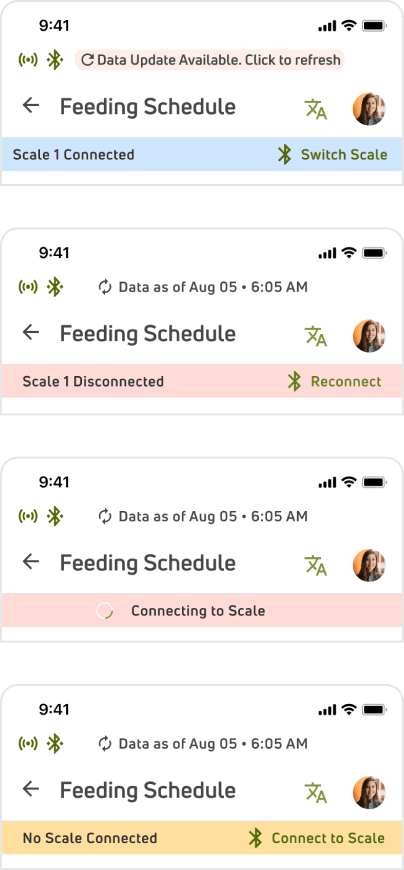
Displaying Connectivity Status
We ensured real-time visibility of the connectivity status and enabled users to take appropriate actions based on the feedback displayed in the connection status bar.
Scale connectivity
Status Bar
Status Bar
Based on the feedback, users can take an action like switch/reconnect and connect scale.
Feed- Basic Navigation
The Feed Dashboard allowed navigation to Feeding Schedules (Feed Operations), Batch Feedings, Weighbacks
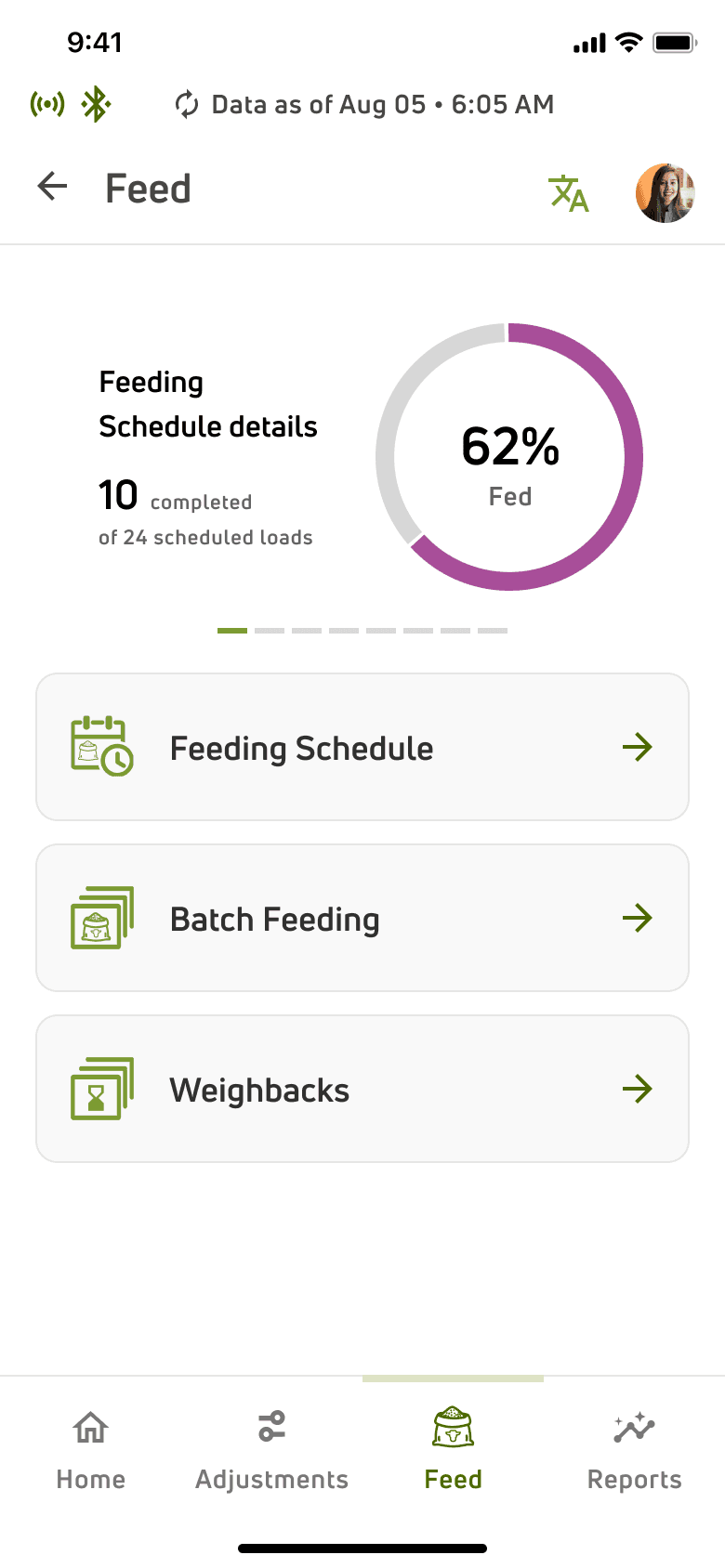
Carousel to display the Load details for Pen Types
Batch feedings allows the mix(s) to be assigned in batches.
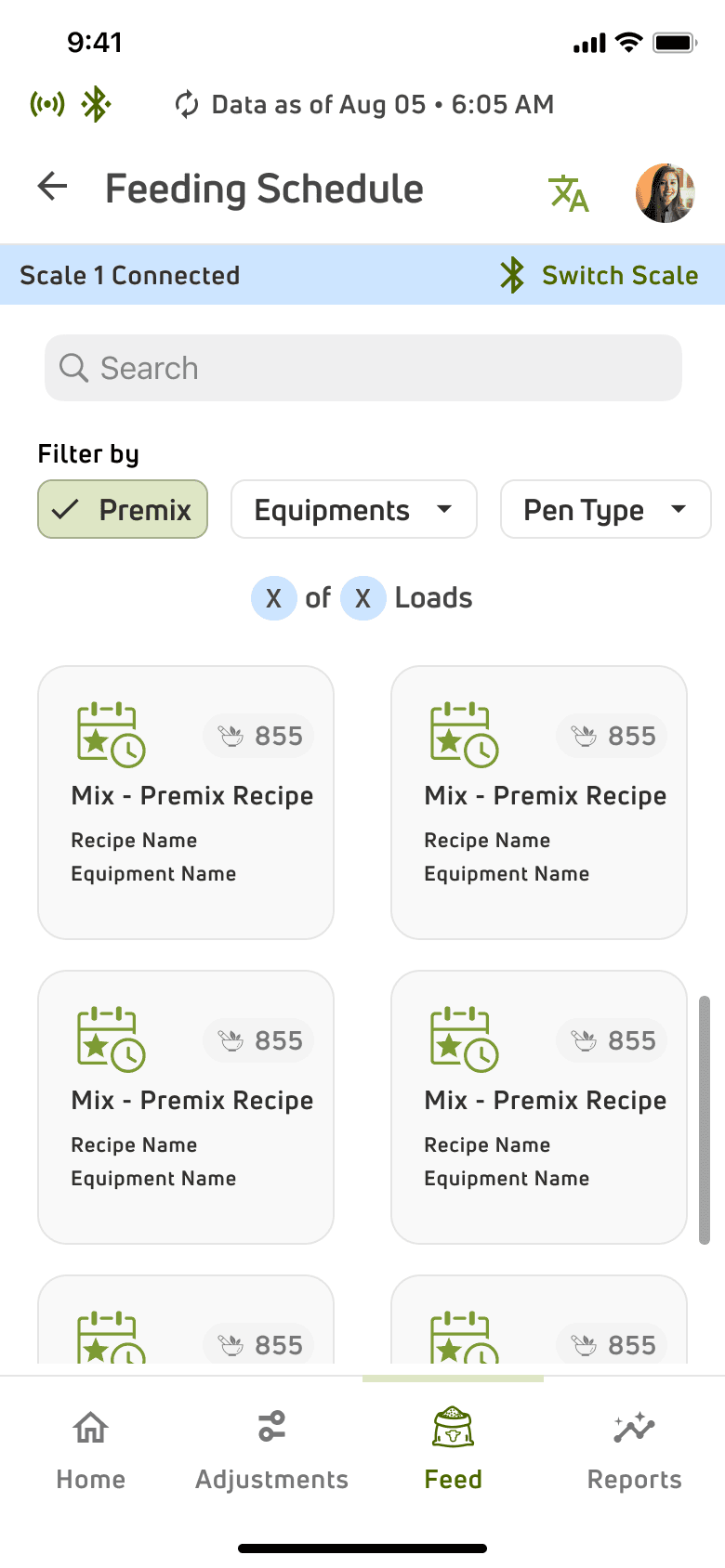
Feeding schedules enables users to view created recipes, and allows mixing of ingredients to create feed (mix) and dropping the feed into the pens.
Weighbacks displays left over feedings after a day.
Efficient Feeding Operation
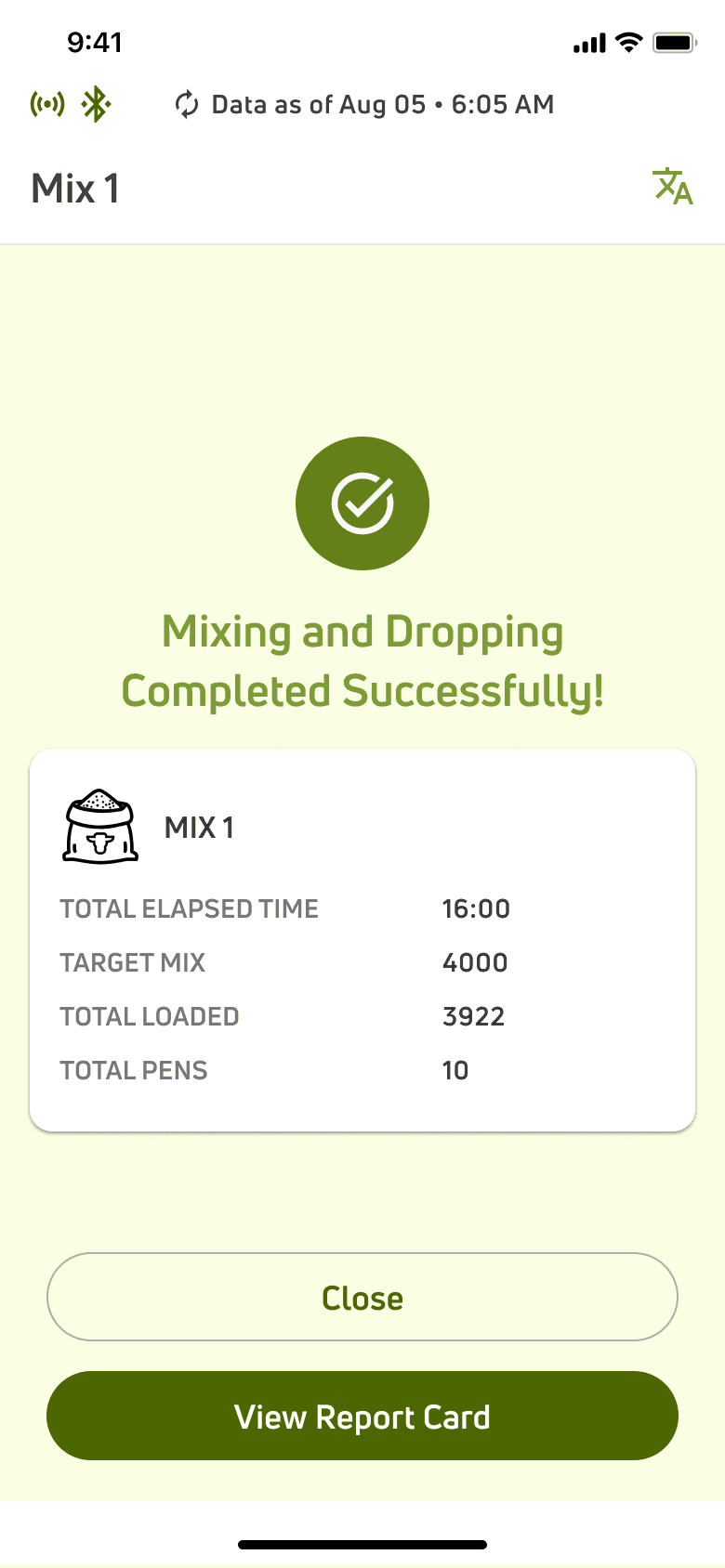
The feeding schedule helps users access recipes, mix ingredients, and drop feed into pens with ease. It reduces errors, saves time, and ensures consistent feeding. Designed for busy, non-tech-savvy users, it simplifies the process for smooth farm operations.
Selected Mix Details
Selected Mix Details
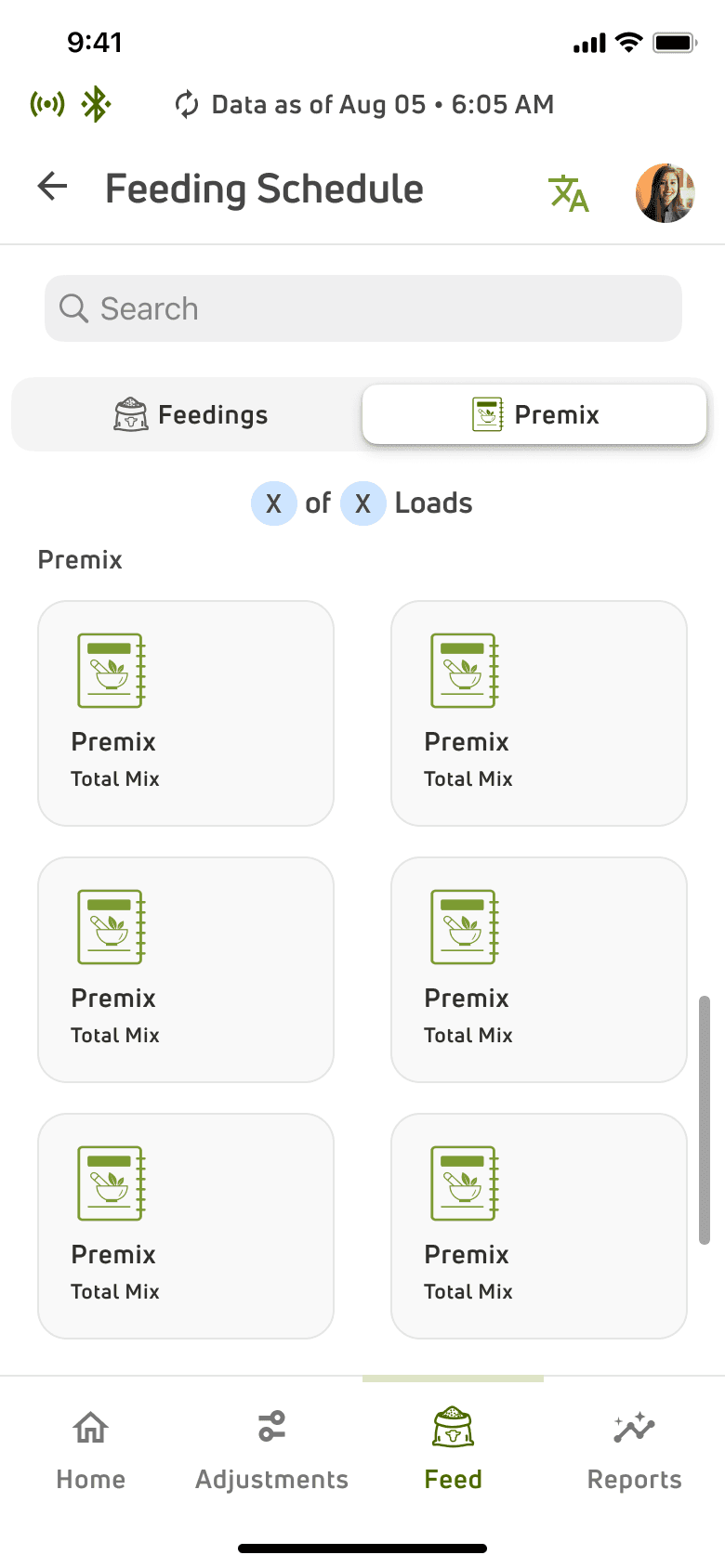
Feeding Schedule Dashboard
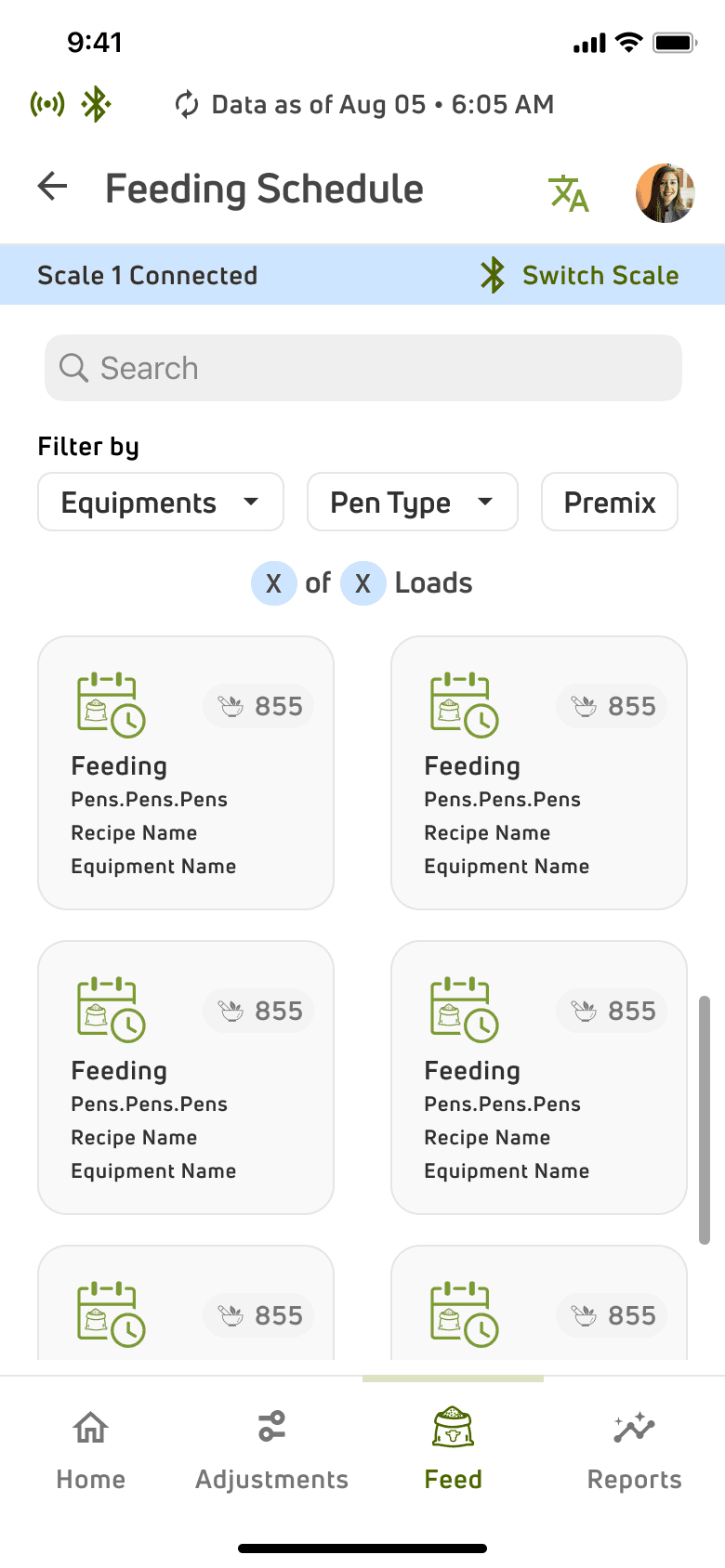
Feedings card showing the mix name and the pens it is scheduled for.
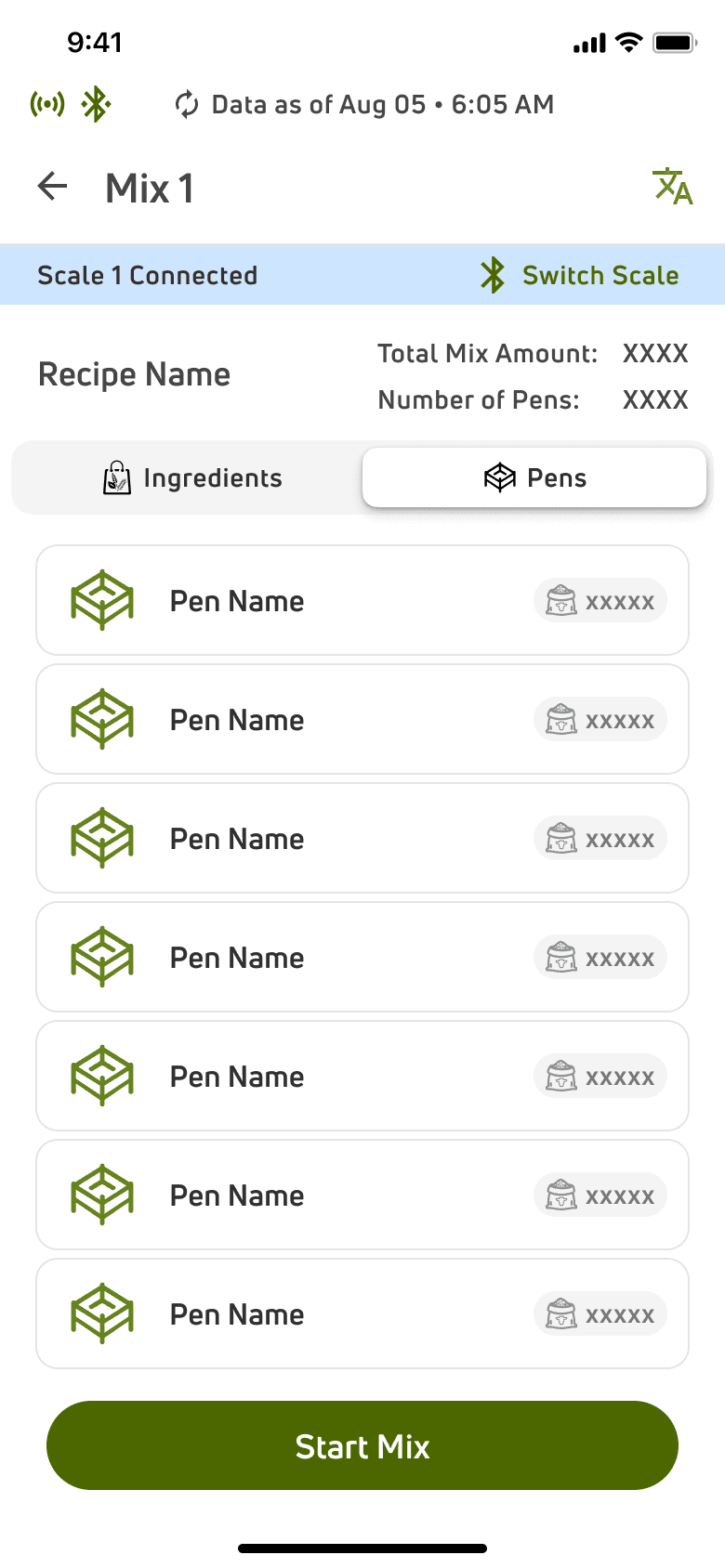
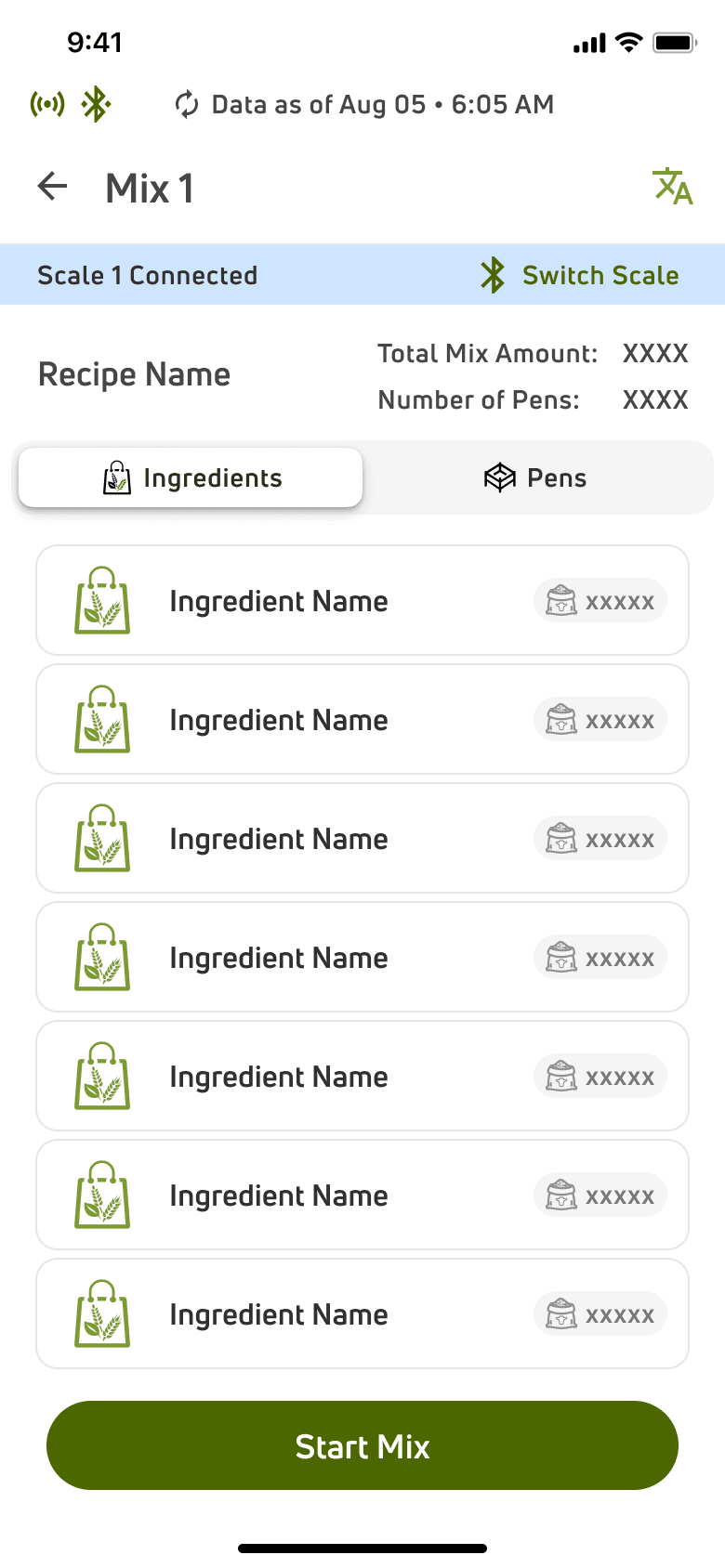
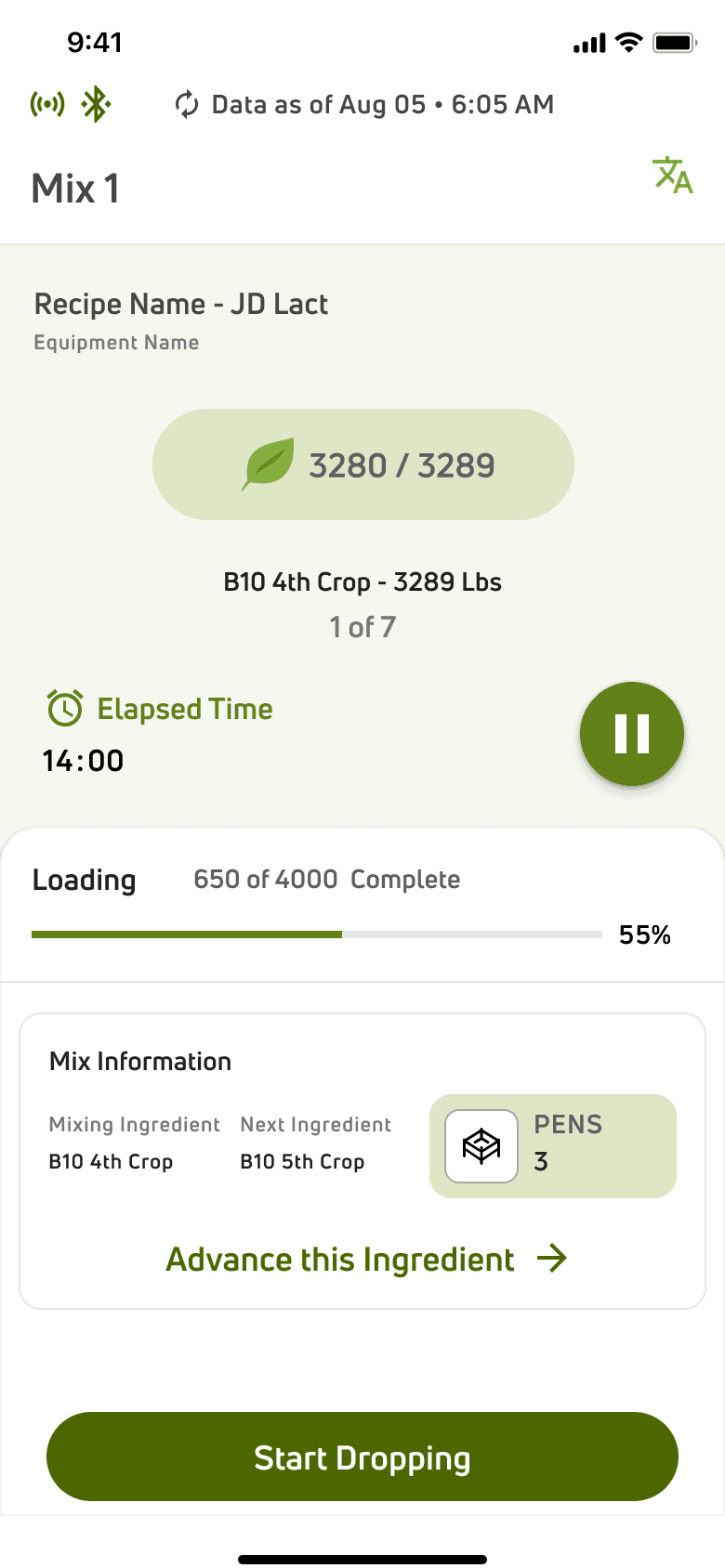
Recipe Name and Equipment Details
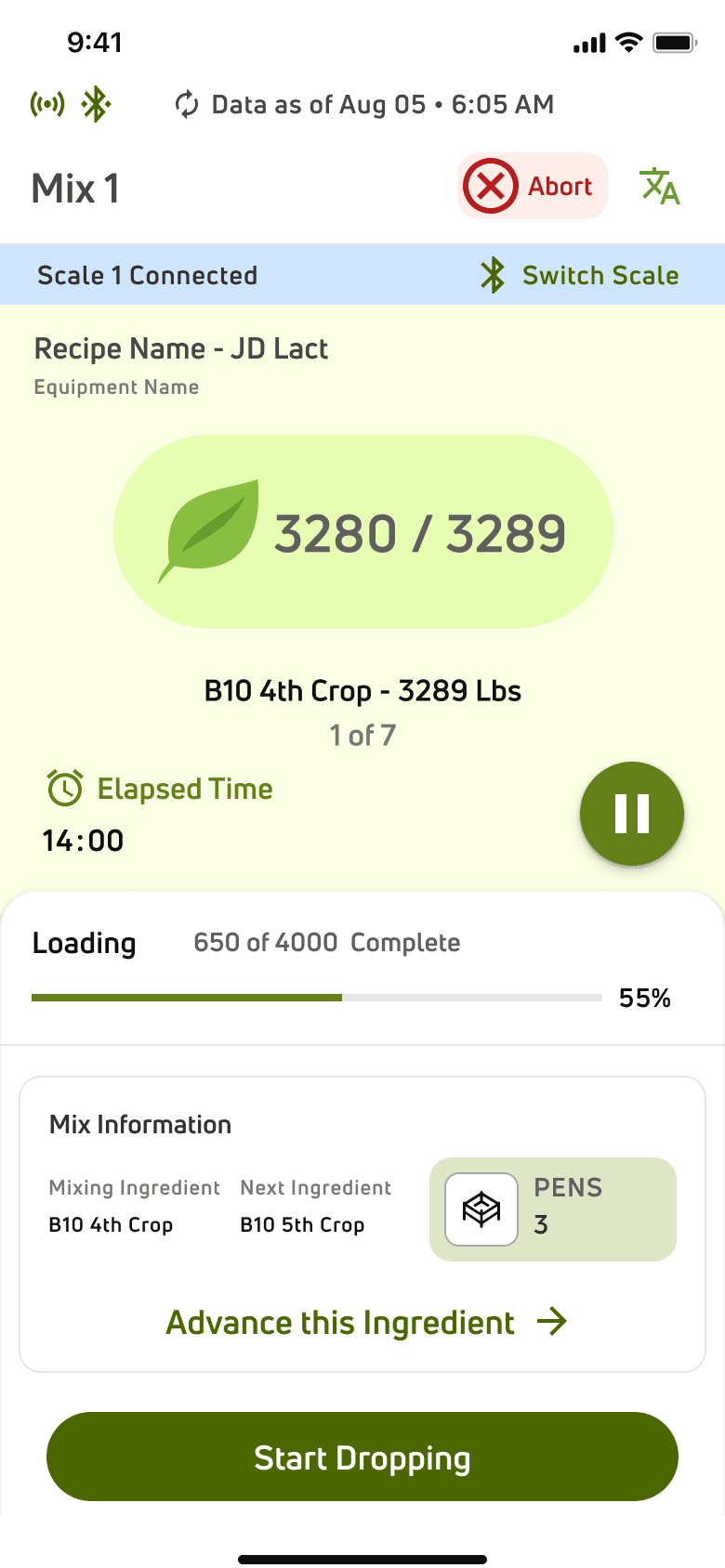
Progress bar to display the weight mixed out of the total weight of the feeding
Overall details of the mix along with the pens allocated
A countdown display for showing the weight mixed out of the total weight of the current ingredient.
The current ingredient being mixed
The user can pause the mixing process at any moment.
Option to start mixing the
next ingredient
The user can abort the mixing process at any moment.
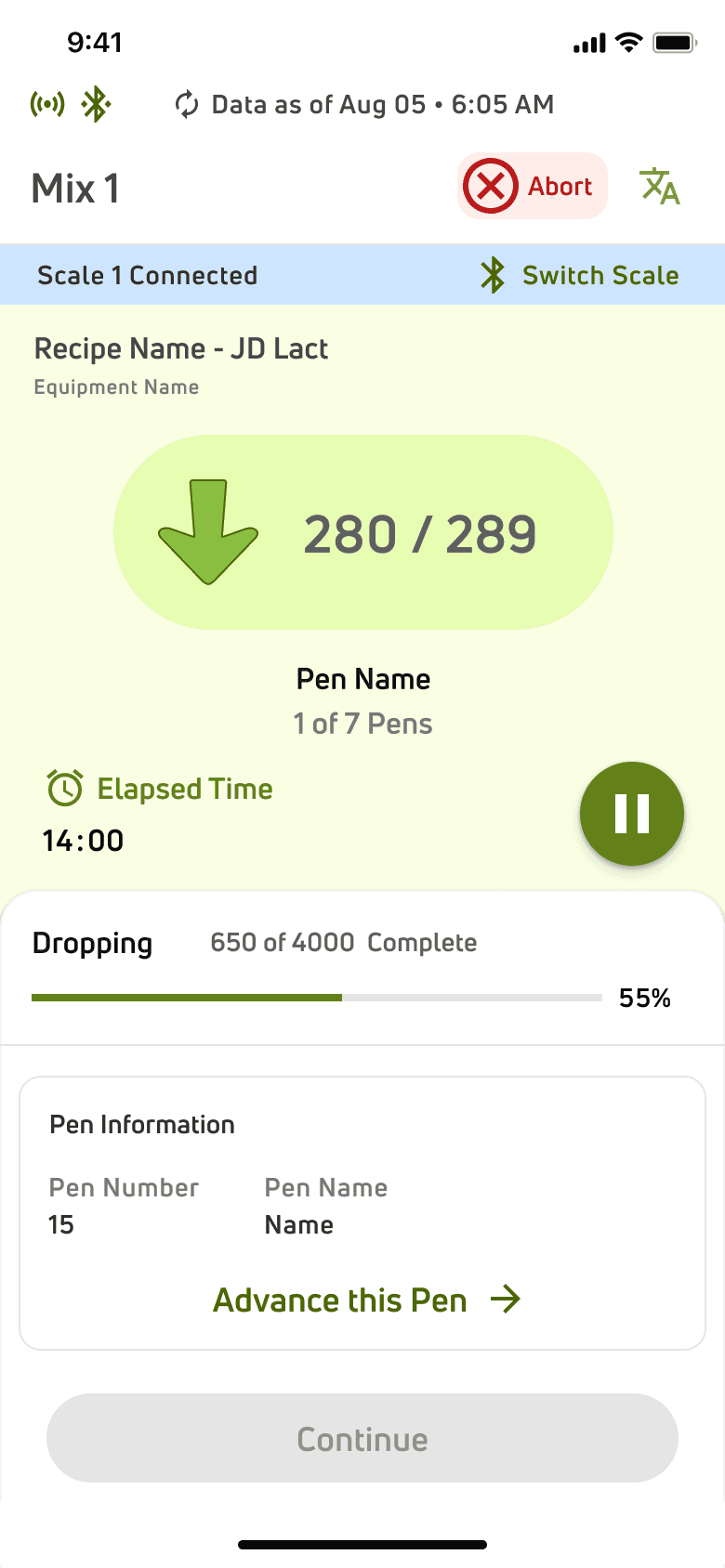
A countdown display for showing
the weight dropped out of the
total weight to be dropped in the
current pen
A card to display the Pen information
And a button to advance drop
to the next pen.
Progress bar to display
the weight dropped out of the total weight of the feeding
ITERATIONS
Some iterations along the way
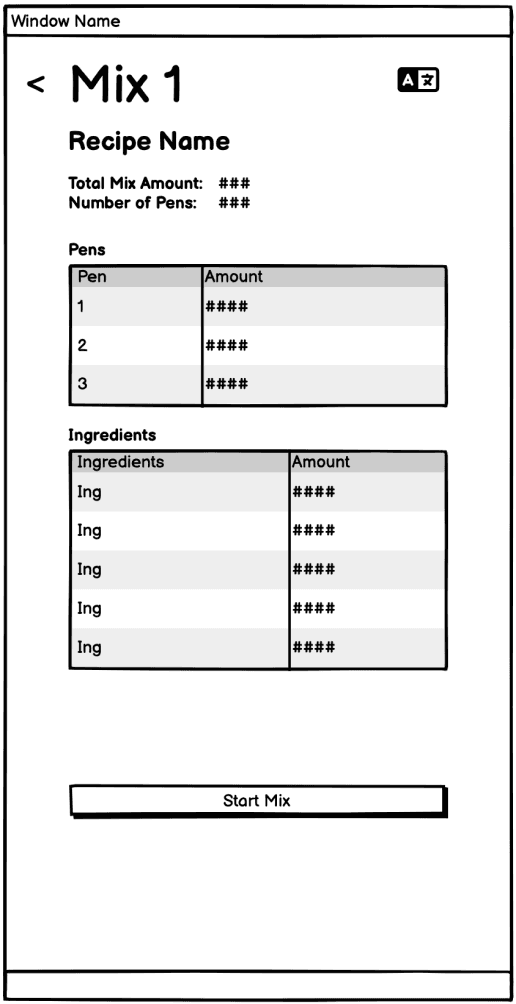
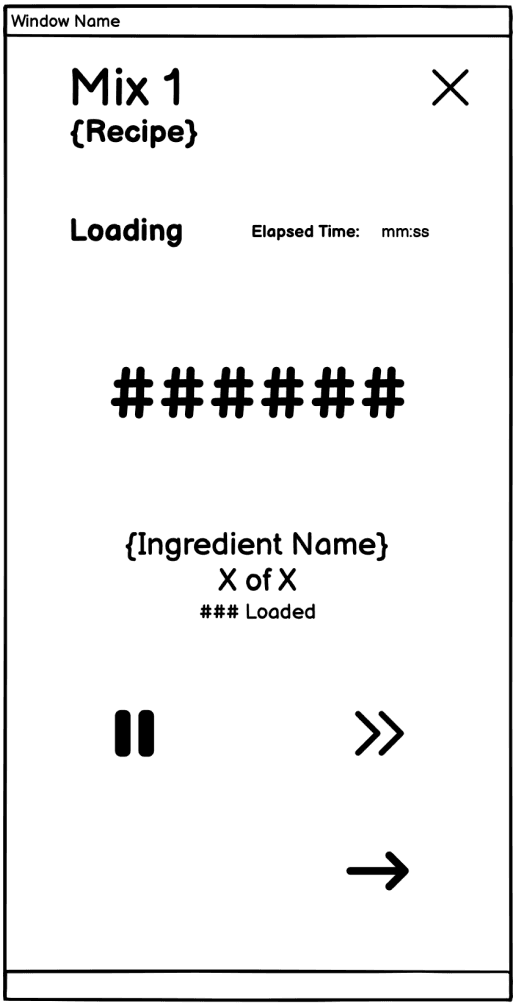
Based on the requirements, wireframes were created for early reviews. After incorporating the early feedbacks, a prototype was created for a round of usability study. Some older explorations-
Participants
8 users
4 feeders, 4 Feed Supervisors
Parameters
Moderated, Remote
Tasks
Create a new feed recipe.
Schedule a feed delivery.
Adjust ingredient quantities in a recipe.
Track feed inventory levels.
Execute feed drop into assigned pens.
Key Metrics
Task completion time, error rates, user satisfaction score, qualitative feedback
Key Areas of Improvement
Low stock alerts not prominent
Increasing Text size and contrast in Feeding Screen
Provision for clear actions with connectivity status alerts
Baseline Result
Task Completion rate- 75%
Average Task Time- 6 Minute per task
Error Rate- 18%
User Satisfaction- 6.5/10
Insights from the First Usability Testing
CHALLENGES
Challenges and Reflections
Designing VAS FeedNext as a completely new feed management system came with its own set of challenges. One of the biggest hurdles was understanding the complex workflows of dairy farm operations and ensuring that the system seamlessly fit into their existing processes.
A major challenge was designing for users with varying levels of tech familiarity—feeders who work in rushed conditions, are often not tech-savvy, and need a system that is both simple and efficient. The interface had to support multiple languages, be intuitive enough to minimize errors, and require minimal training.
Additionally, balancing business needs with user needs required careful prioritization. While we envisioned several advanced features, we had to focus on delivering core functionalities first, ensuring a solid foundation for future enhancements.
My learnings:
Through this project, my biggest learning was how to design for a highly specialized industry while keeping usability at the core. Creating a system for users who are always on the move, work under time constraints, and may not be tech-savvy meant simplifying interactions without losing functionality. It reinforced the importance of designing with empathy—understanding user behaviors, constraints, and priorities to create a solution that truly works for them.
IMPACTS
Validations
Multiple rounds of usability testing were conducted to evaluate the effectiveness of the new VAS FeedNext design. These tests helped us refine the system to ensure it met the needs of feeders and supervisors while improving overall efficiency.:
The time taken to create and drop a feed mix into pens was reduced significantly, streamlining the feeding process for farm workers. There was a reduction by nearly 90%.
Overall user satisfaction improved, with feeders finding the system easier to navigate and requiring less training, addressing the challenges of a rushed and non-tech-savvy work environment. The rate increased by nearly 94% improvement.
NEXT STEPS
Future Explorations
AI-Driven UX – Implement AI-powered recommendations for seamless feed management.
Advanced Insights – Enhance dashboards with deeper analytics for better decision-making.
Sound cues- Introduce sound cues in notifications to make alerts more noticeable in fast-paced or busy environments.