ADP Global View
Bringing payroll approval into the dashboard to help practitioners review, clarify, and approve payroll faster
The Project at a Glance
Project Type
Product Re-design
for CCMR3’s CollectLogic
Duration
1 month
Contribution, Methods and Tools
User Research, Usability Studies, Affinity Diagram
Hi Fidelity Designs, Figma
Role
Primary UX Designer
Priority Areas
Approve Payroll Task
Outcome
50% reduction in time at task
As part of my commitment to client confidentiality, I’ve carefully modified certain details in this case study to comply with our non-disclosure agreement (NDA). This overview focuses only on the high-level research and design process while ensuring all proprietary information remains secure.
B A C K G R O U N D
The Context
ADP’s payroll processing flow involves multiple steps, with Approve Payroll being the final and most critical one. Any delay at this stage directly impacts employees getting paid on time, making accuracy, clarity, and speed essential.
In the existing ADP payroll process, the final Approve Payroll step happened outside the dashboard. Once payroll calculations were confirmed, practitioners received a sign-off document via email, reviewed it independently, and communicated any questions back to ADP through email. This fragmented, email-driven flow made a critical, time-sensitive step harder to track, slower to resolve, and prone to delays in payroll processing.
Associate
Associate share the Sign off document Via Email
Practitioner confirms and approve the document over email if no changes are needed.
Practitioner emails if any changes required and sends back to associate.
Payroll practitioner
Payroll Approved
My Role
Working alongside the Project Manager and UX Researchers, I led the UX design for bringing payroll approval into the ADP dashboard. I translated user pain points into actionable design solutions, created the approval and communication flows, and refined the designs through multiple iterations informed by usability testing.
E A R L Y D I S C O V E R I E S
Usability Testing
UX Researchers conducted usability evaluations on the existing payroll approval flow to assess how practitioners reviewed and signed off on payroll. The study revealed that relying on email to review sign-off documents created friction in an otherwise structured dashboard experience. Participants struggled with context switching, tracking conversations, and resolving issues efficiently, often leading to delays in approval.
Talking to the Users
In parallel, user interviews with payroll practitioners uncovered consistent frustration with the email-driven approval process. Practitioners highlighted the lack of visibility, slow turnaround for clarifications, and uncertainty around payroll status as key pain points. These insights reinforced the need to bring payroll approval and communication directly into the ADP dashboard.
“I have to keep switching between emails and the system to understand what’s pending.”
— Payroll Practitioner
“If something isn’t clear, it can take days just to get one answer over email.”
— Payroll Practitioner
D E F I N I N G T H E P R O B L E M
Problems for Payroll Practitioner
Payroll sign-off documents were shared only via email, disconnected from the payroll dashboard.
Reviewing complex payroll data in a static document made it difficult to quickly identify issues.
Any questions or discrepancies required back-and-forth email conversations with ADP associates.
Lack of visibility into resolution status created uncertainty and anxiety around payroll completion.
Problems for ADP/System
Email-based communication led to long approval cycles, sometimes delaying payroll by several days.
High dependency on associates to track, respond, and follow up on emails.
No centralized audit trail of conversations linked to a specific payroll run.
Increased operational effort and risk for a highly time-sensitive process.
T H E A I M
Defining the Aim
I identified and analyzed the key pain points, broke down the opportunity areas for improvement, and further narrowed the problem scope to focus on the most impactful areas for the design:
How might we help payroll practitioners approve payroll faster by bringing review and clarification into the ADP dashboard?
D E S I G N R E Q U I R E M E N T S
Key decisions
Key design decisions that were chalked down as a requirement for this piece.
In- dashboard
Payroll summary
Contextual
Communication
Action oriented
approval
Transparency and
Confidence
In-dashboard payroll summary
Introduce a clear, scannable summary view of the sign-off document within the payroll dashboard.
Highlight critical payroll data points instead of forcing users to parse lengthy documents.
Contextual communication
Enable practitioners to raise questions or flag issues directly within the approval flow.
Conversations to be tied to specific payroll items, removing ambiguity.
Action-oriented approval
Allow users to approve, request clarification, or resolve issues without leaving the dashboard.
Reduce cognitive load by keeping all actions in one place.
Transparency & confidence
Clear status indicators for:
Pending clarifications
Resolved issues
Ready-to-approve payrolls
T H E S O L U T I O N
Picking up the most important piece from the sign off document
Simplifying the review process
In order to simplify the review process for the practitioners, the key pointers from the sign off document were to be brought in as a summary so that the users do not have to go through the document at lengths every time.
Without missing any critical information, and with the help of researchers we pick up the key points from sign off document to be included in the summary, which were later also validated in the usability testings.
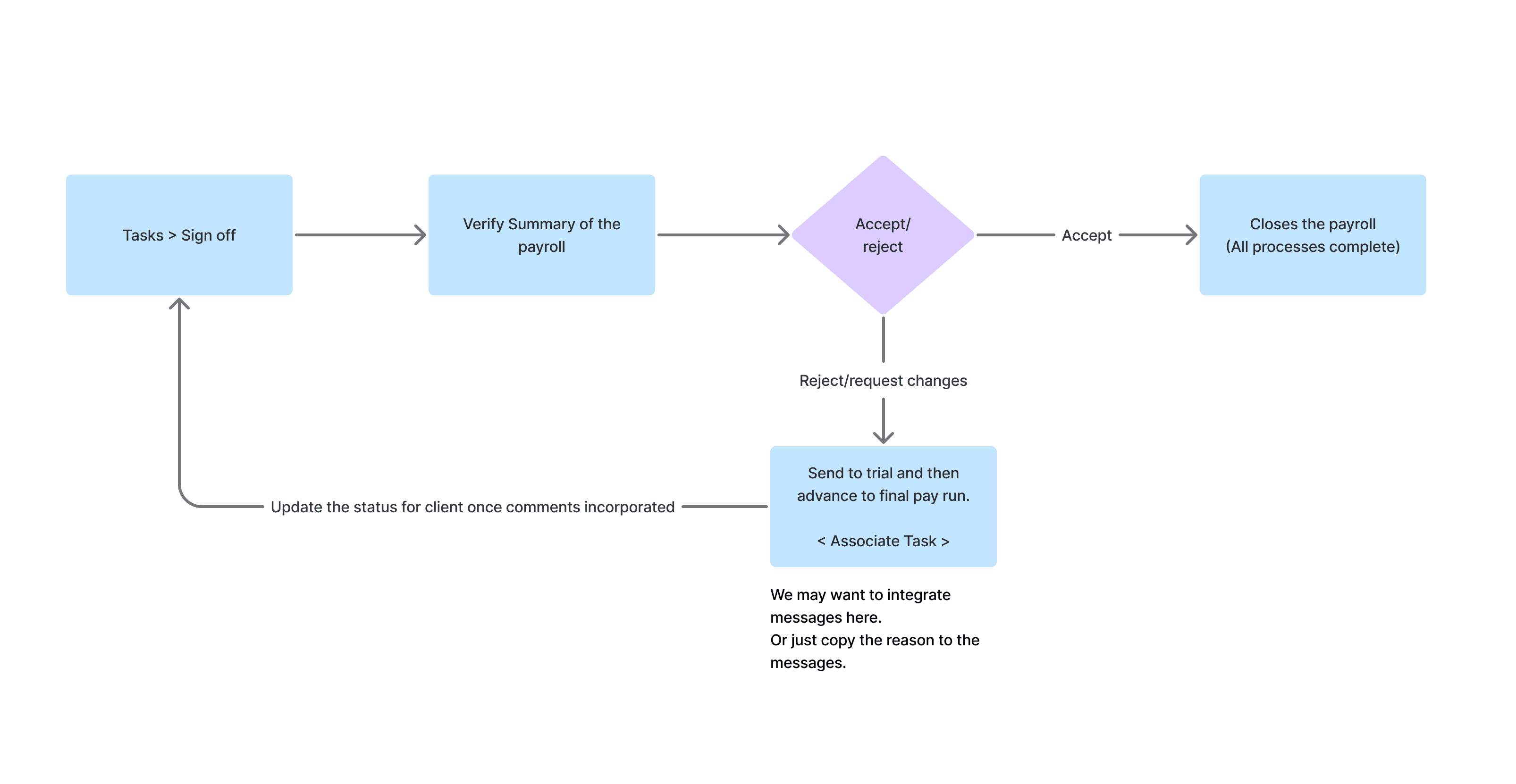
Defining the flow
Approval task
Iterative process
Iteration 1
The design process followed multiple iterations and testing and feedback post them. Here are insights from the first usability feedback.
Payroll Processing Dashboard
Sign off/Approval Modal
Approval Flow:
Rejection Flow:
ITERATION 1
Key Inputs after Usability Testing on iteration 1:
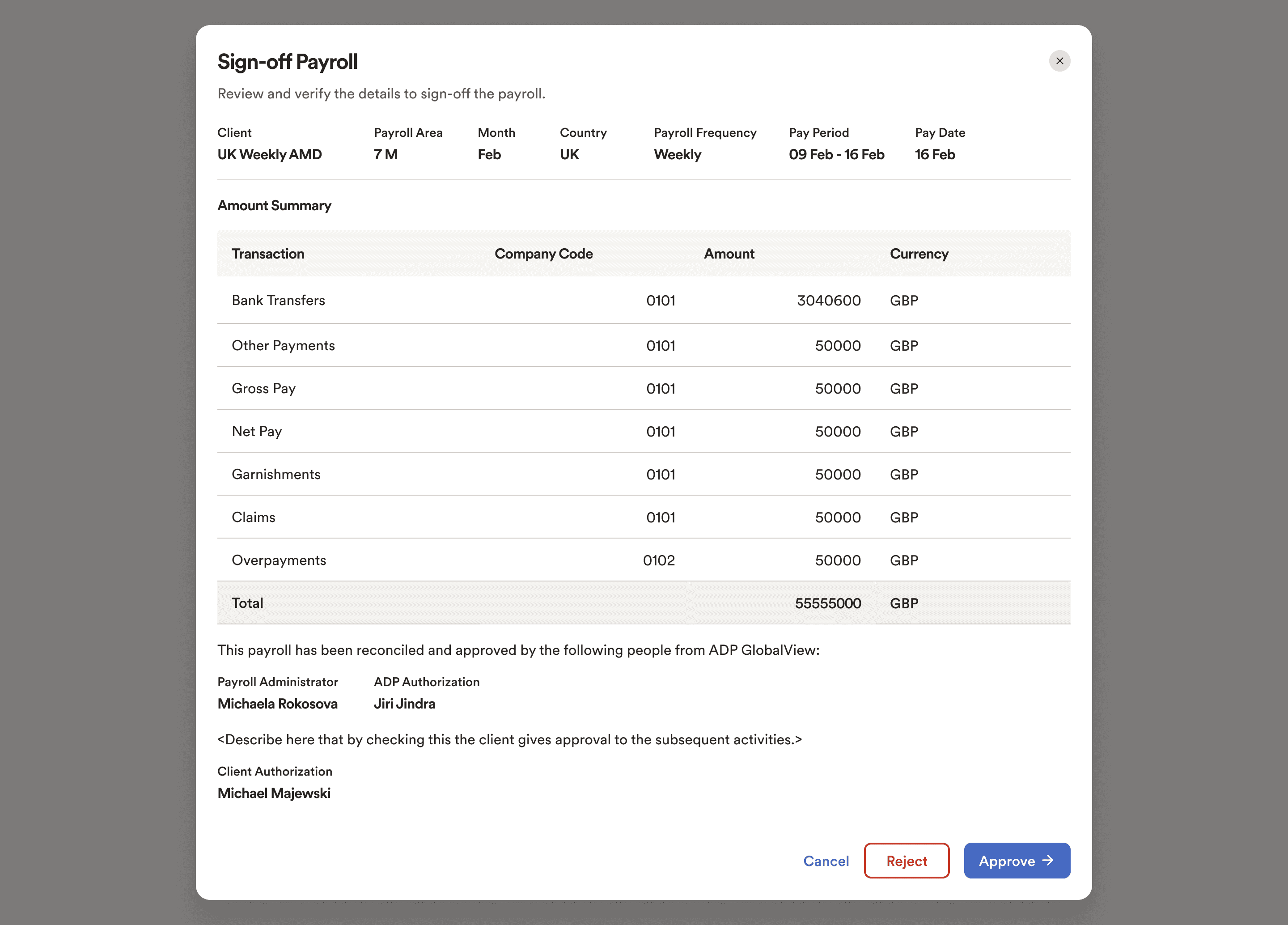
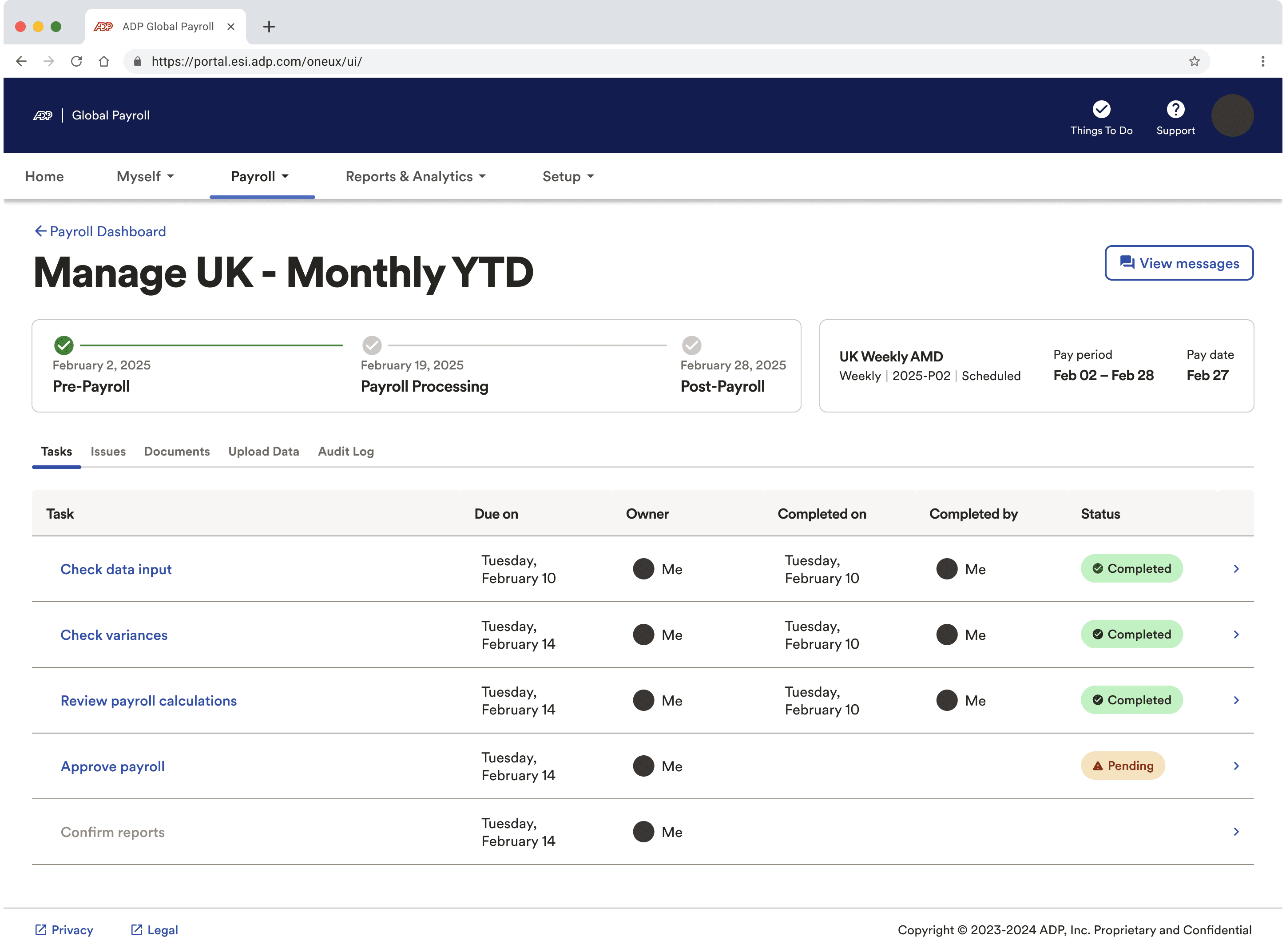
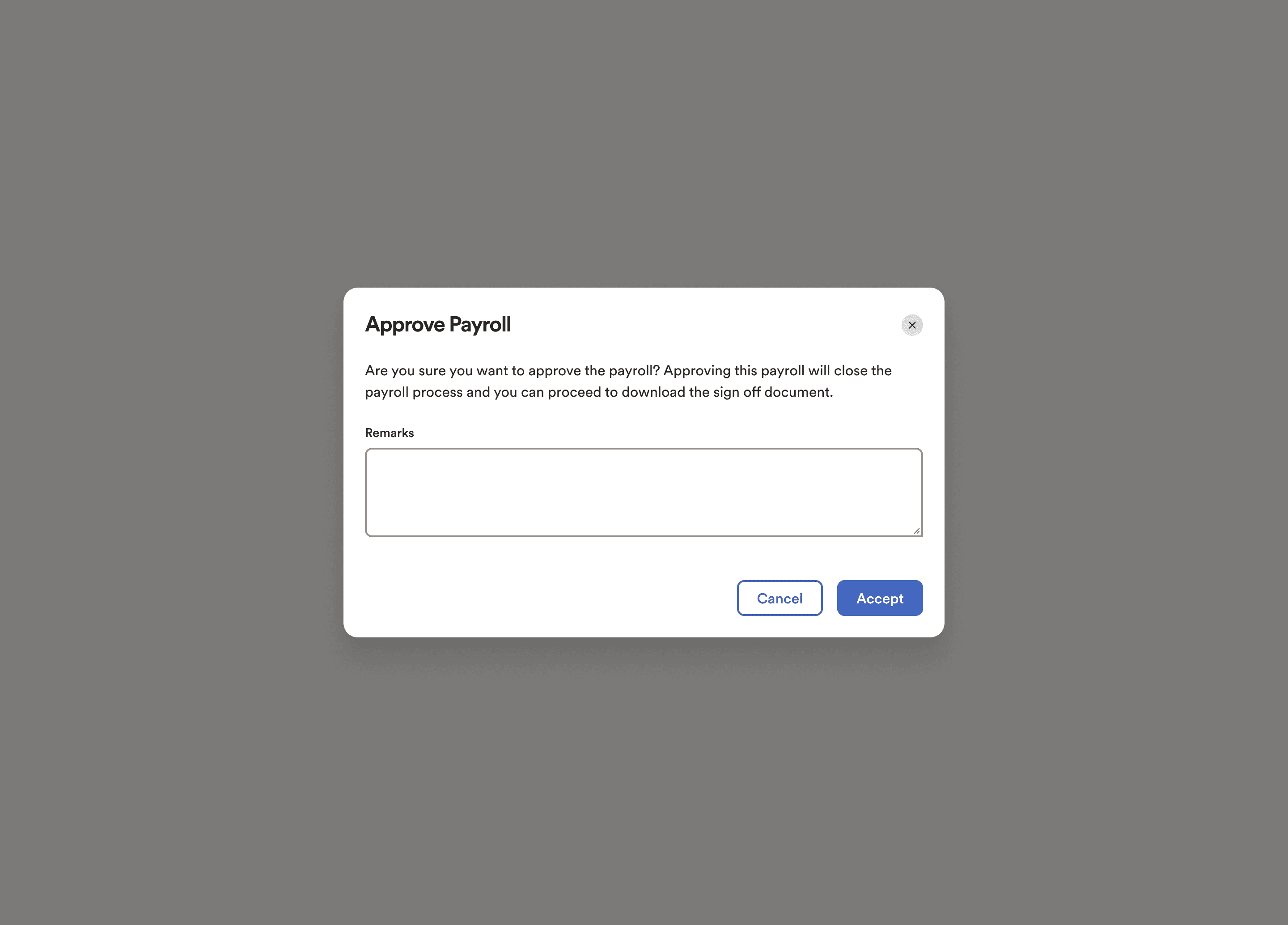
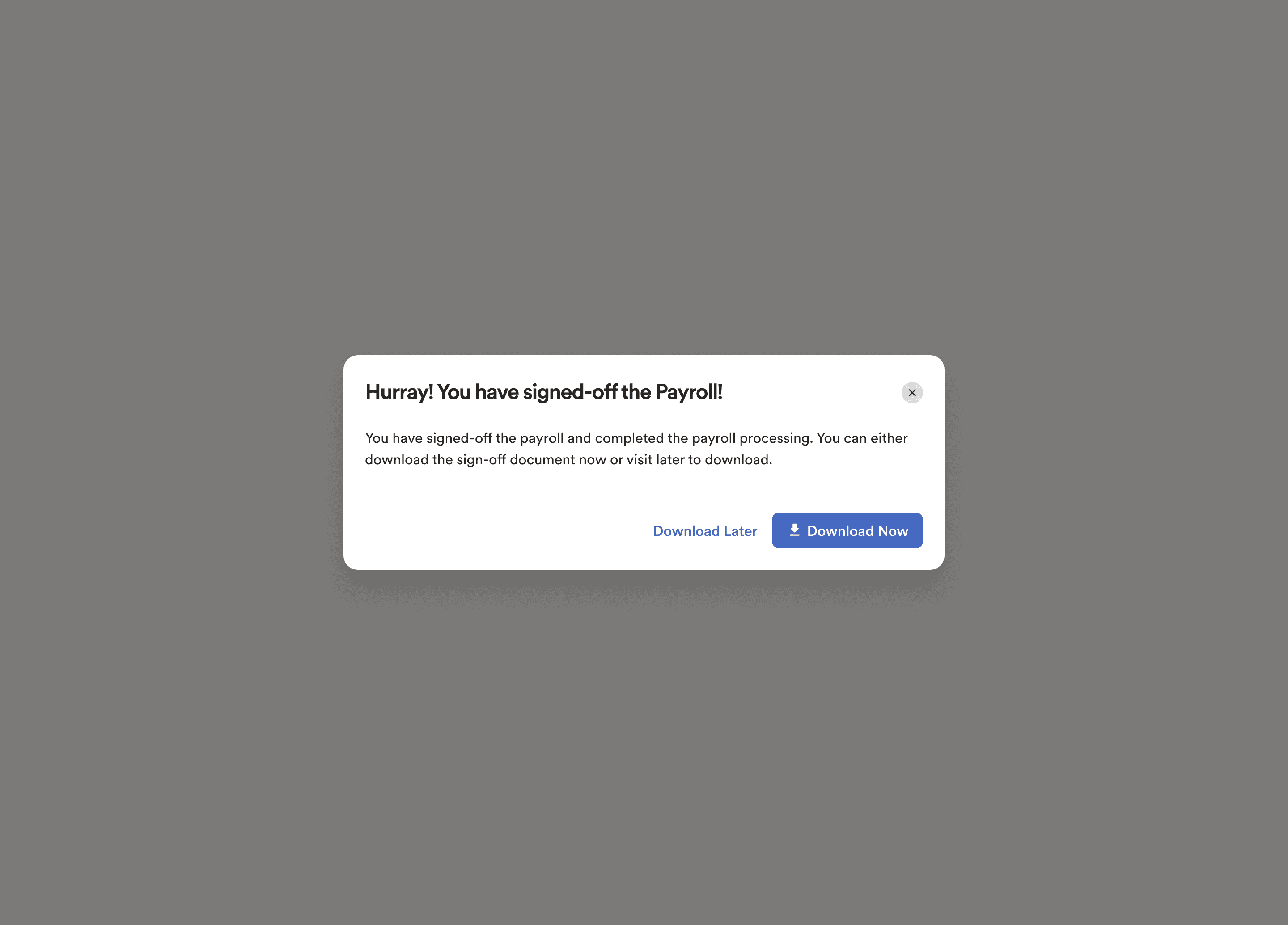
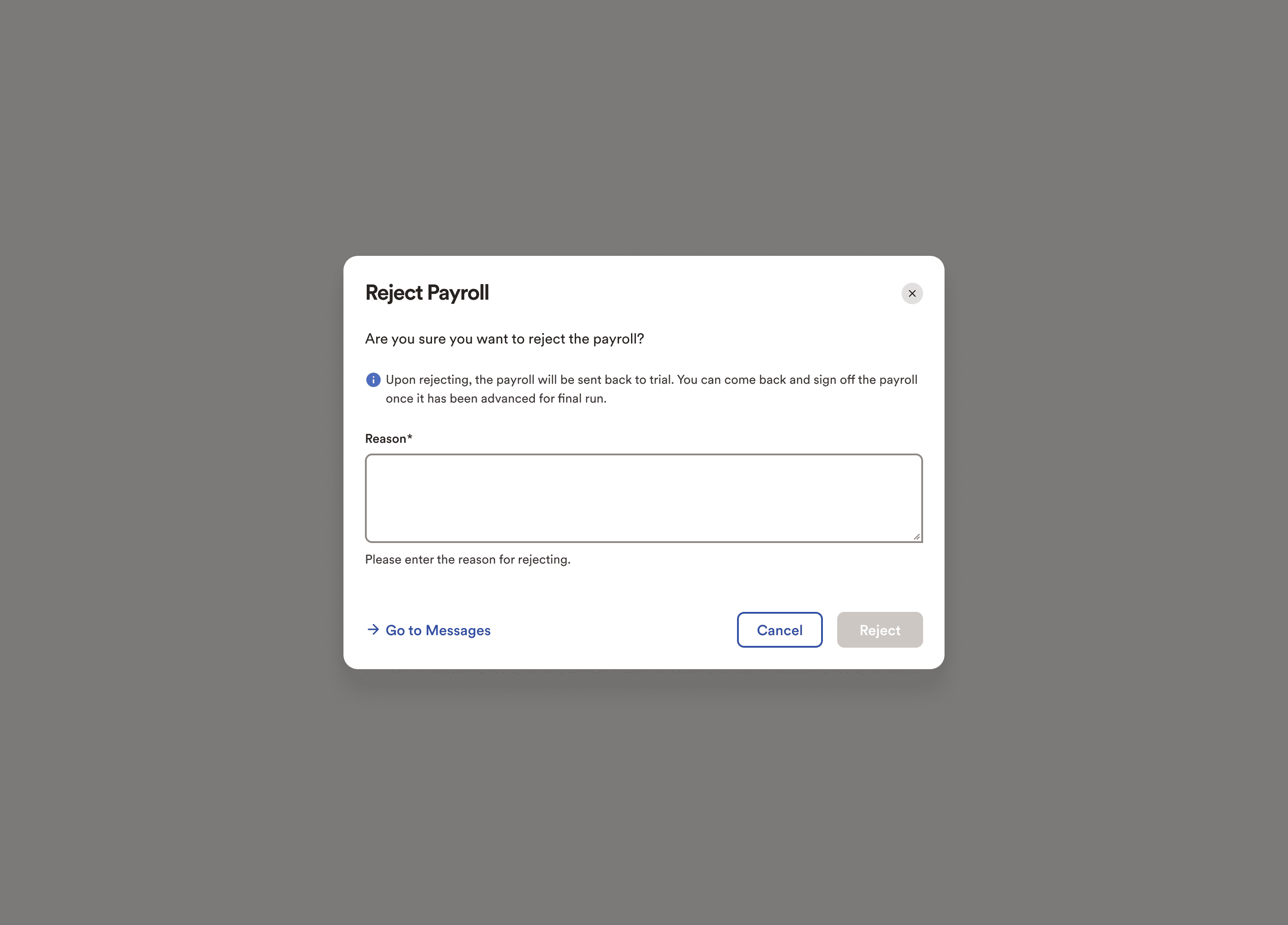
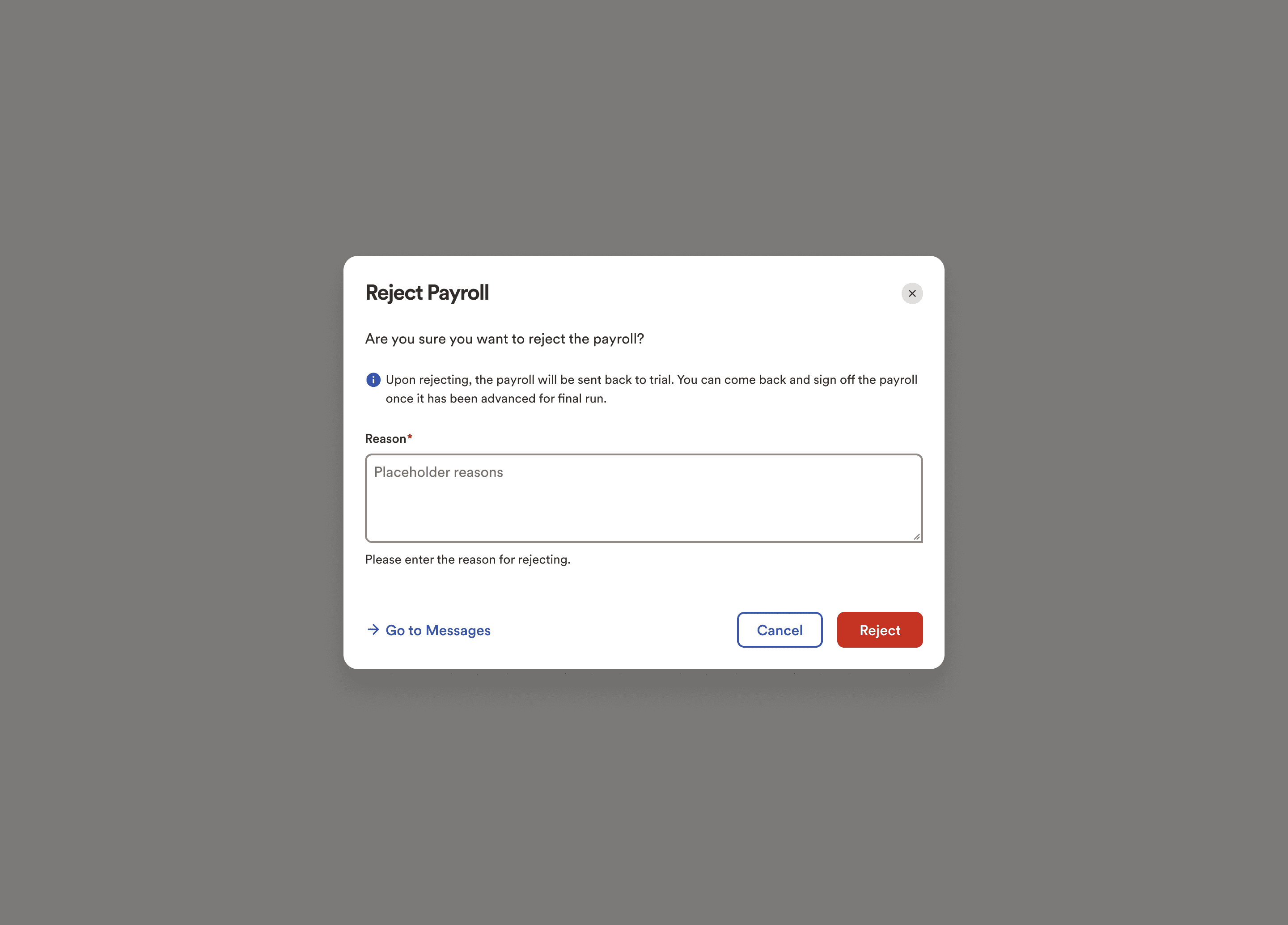
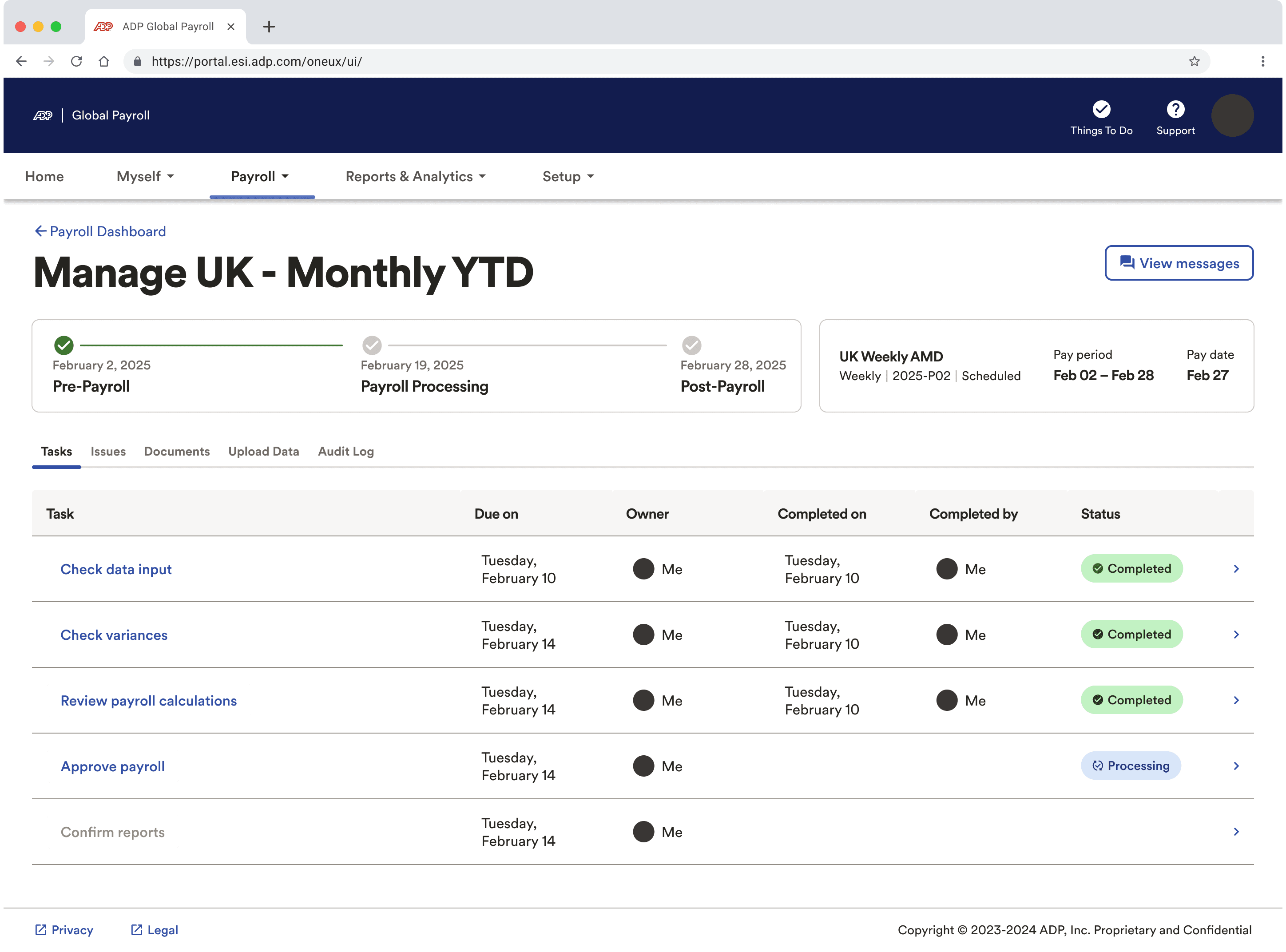
Approve Payroll was brought inside the task list of the payroll processing. This was aimed to bring the whole experience at one stop without having to navigate between email and portal.
The sign-off process was introduced as a modal with a summary of the sign of document and the action to approve or reject it.
Clicking on “Approve” guided users to a confirmation modal to approve the payroll and add any additional remarks.
Clicking on “Reject” guided users to a the reject modal where they were required to input the changes they wanted incorporated in the sign off document calculations.
Additionally there was also an entry point to the messaging experience to enable real type conversations.
Summary
Actions
What this version solved:
Brought in the sign off task to the payroll processing dashboard
Validated the data that the users wanted to review from the document in this step.
Clearly defined the tasks- approve and reject, after reviewing.
Enabled addition of comments/remarks for any communication.
Problems with this iteration:
The users lacked insight into the exact calculation they wanted to comment on, when they navigated to the approve/reject modal. They needed a side-by-side view to help them better.
The nature of these comments did not require an entry point into the messaging experience. Multiple entry points created confusion and increased cognitive overload.
Solution
Incorporating feedback from the previous version, a newer better solution was designed which also performed better on the usability anaysis and feedback.
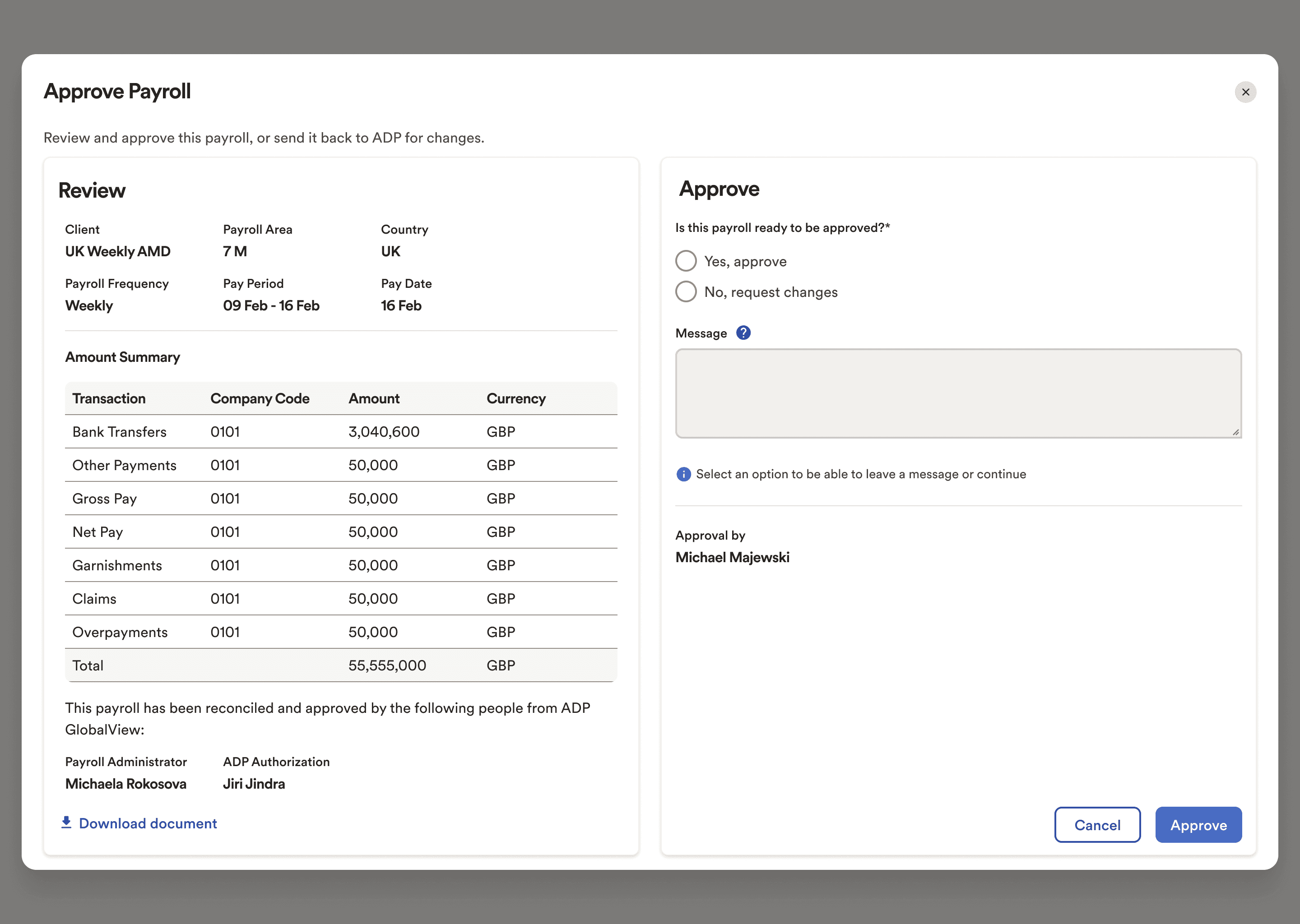
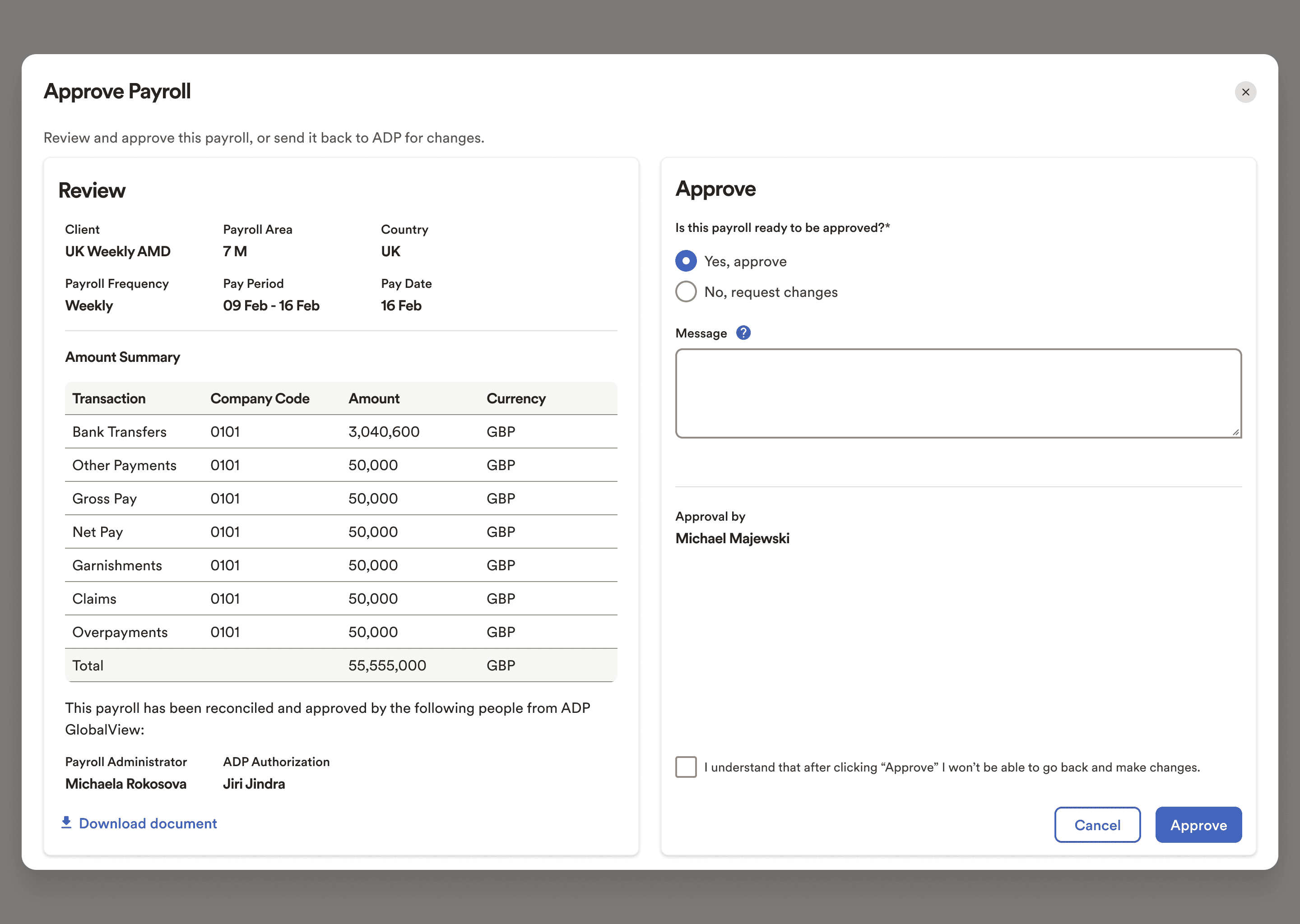
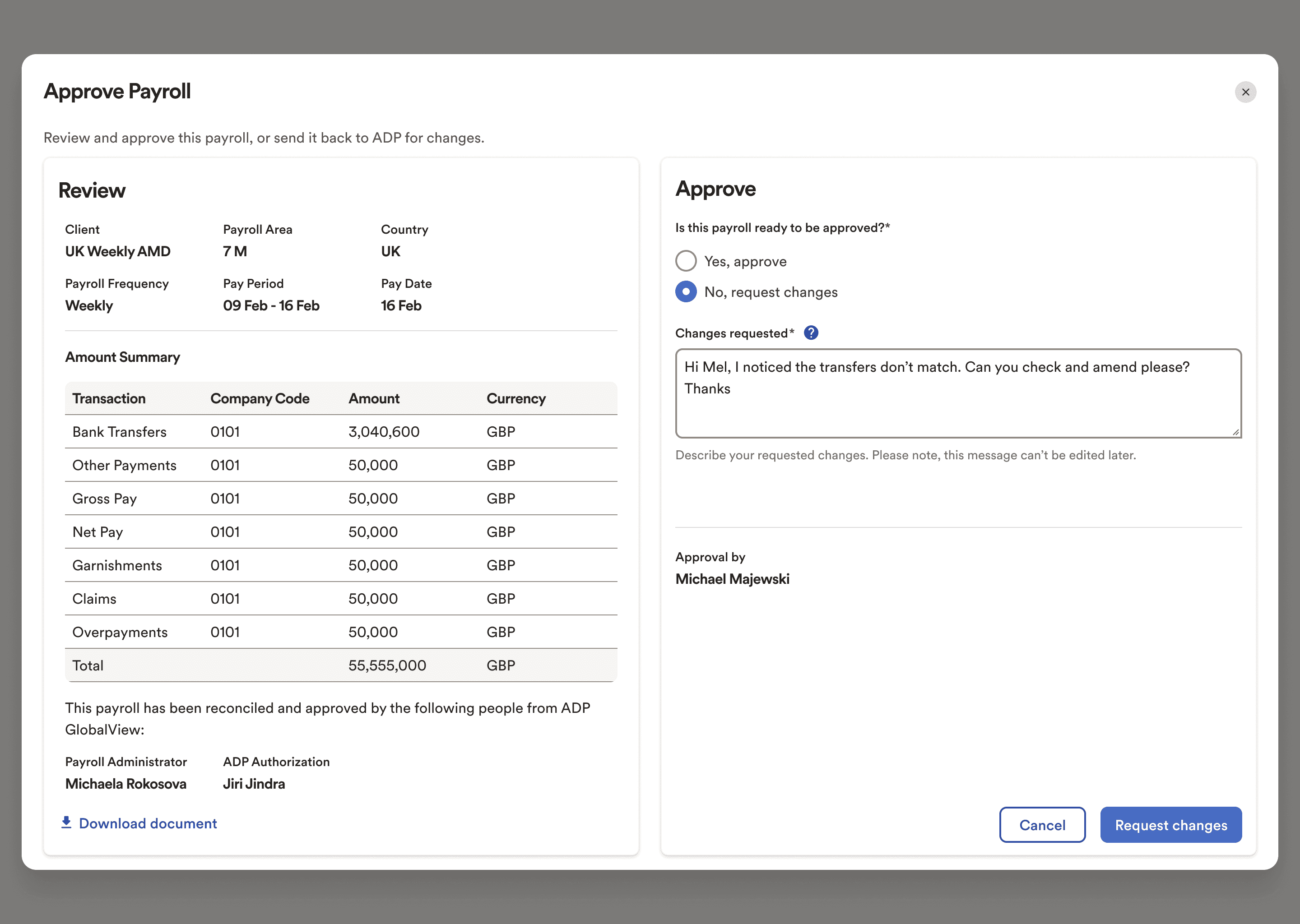
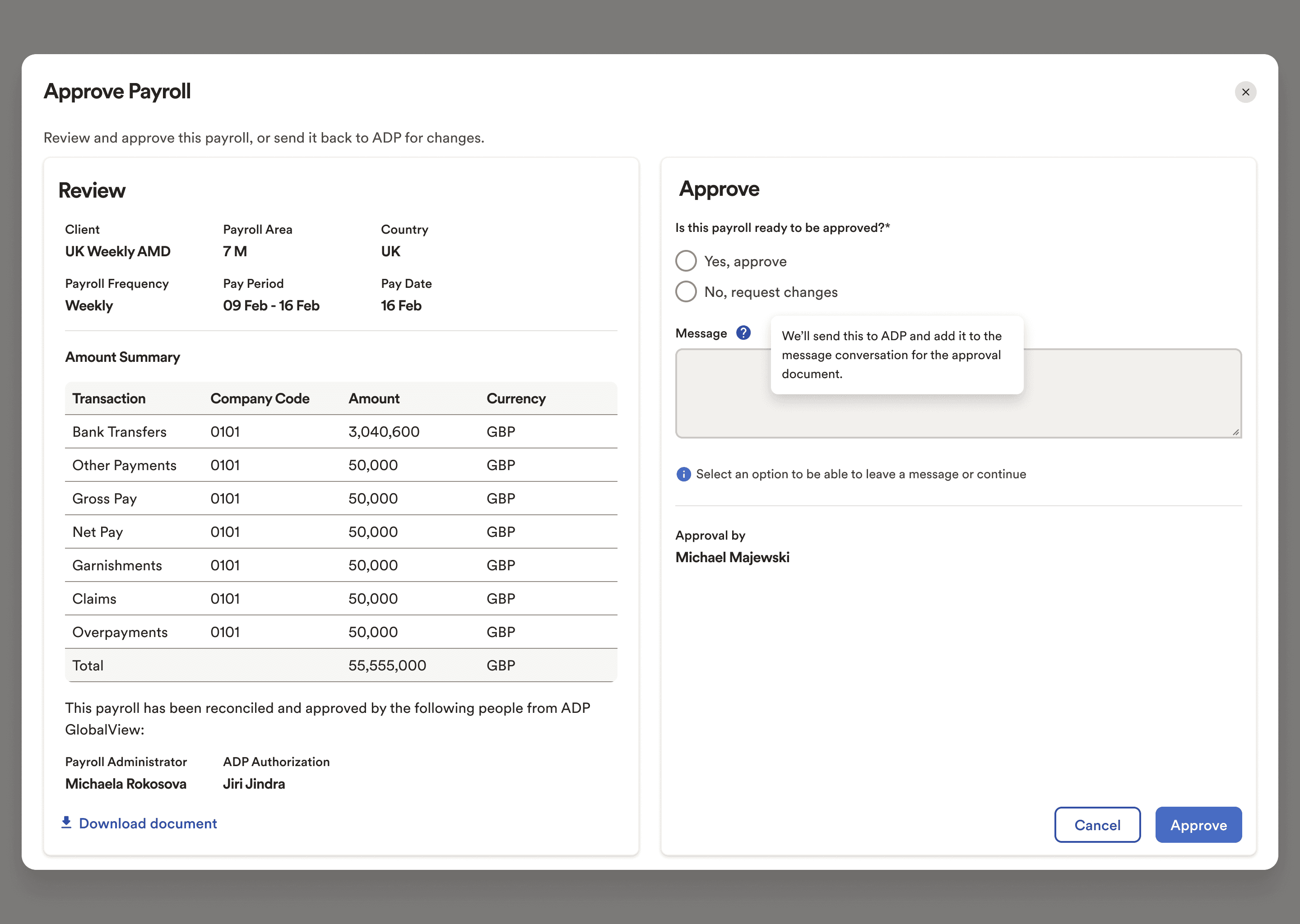
Approve Modal
Approval Flow:
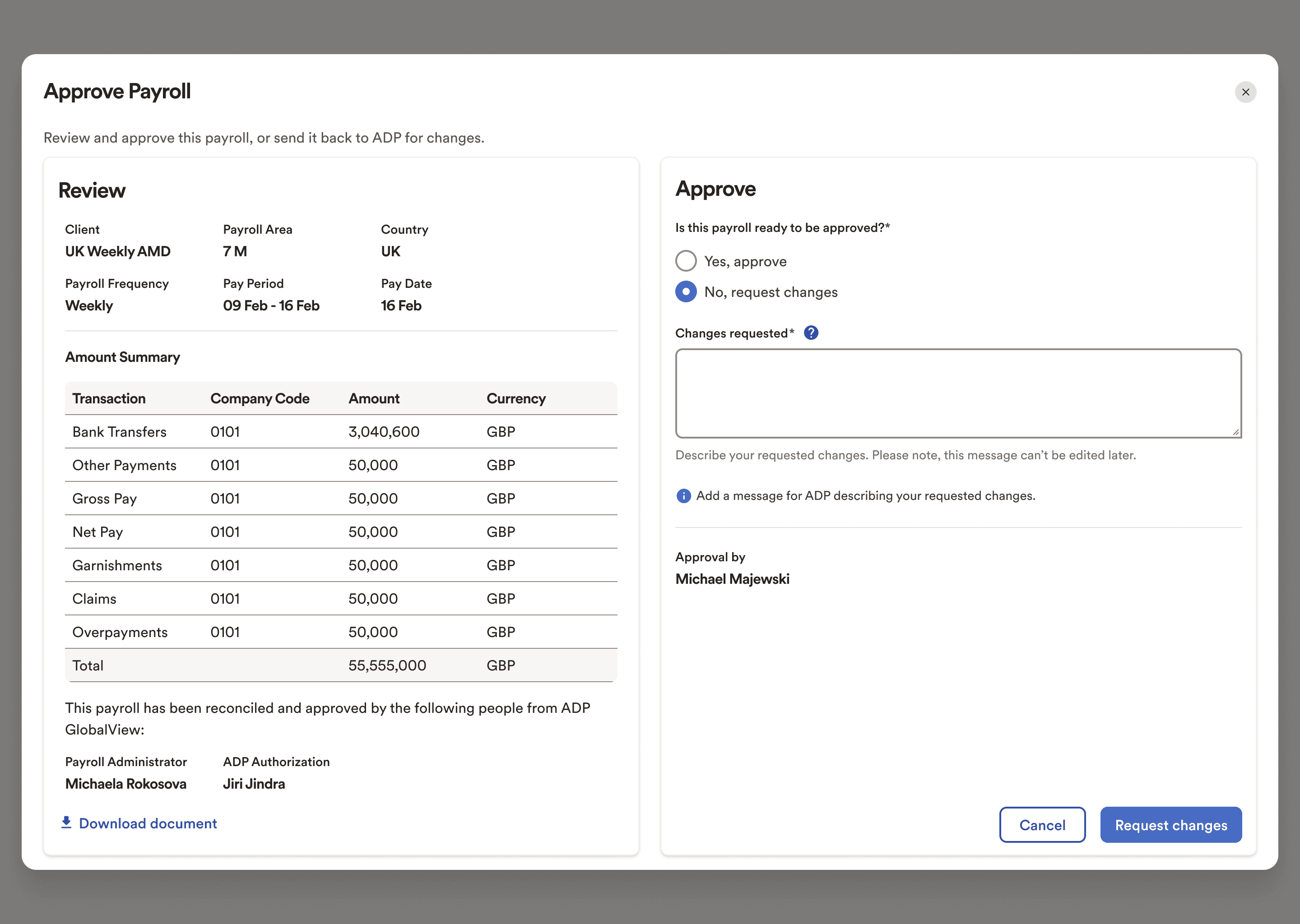
Request Changes Flow:
Helper text:
SOLUTION
The modal was now redesigned to a single screen approach to review the calculations and perform the actions side-by-side.
Dynamically updating section based on the selection made by the users.
Dynamically updating buttons based on the selection made by the users.
Additional option to download the sign off document in case they want to review any additional piece in more depth.
Selecting “Approve” enables a confirmation checkbox at the bottom, while enabling the message box in an optional state.
This is a one screen- one step solution considerably reducing time.
Selecting “Request Changes” enables a the message box with the label “request changes” for clarity in a mandatory step.
The term “reject” was replaced as it gave the sense of a negative action, while requesting changes is just an alternative parallel action.
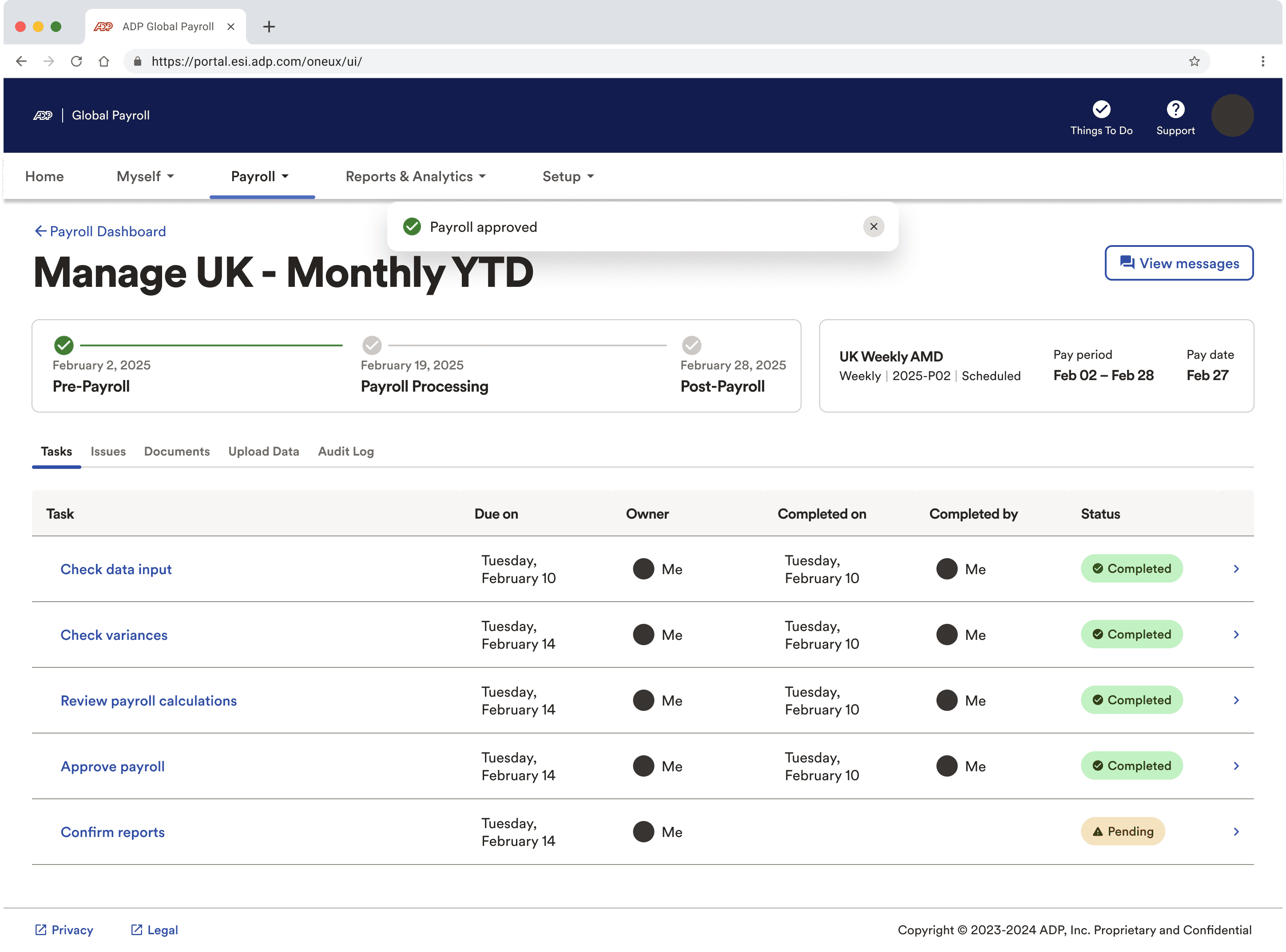
Approving the payroll, marks the step as “Completed”
Requesting changes in the payroll changes the status to “processing”, depicting background changes being made from the associate’s end.
Rather than providing an entry point into the messaging experience, the users would just be informed that there comment would also be populated in the messaging experience, should they wish to have a thread communication.
Removing this unnecessary entry point at this step reduces cognitive load.
Key Inputs after Usability Testing round 2:
Key metrics
~40–50% reduction in time to review and approve payroll
(Compared to the existing email-based flow)
System Usability Scale (SUS) score improved from ~68 to ~85
(Moving from “OK” to “Excellent” usability)
100% of participants preferred the in-dashboard flow over email-based approval
What this version solved:
Brought in a side by side experience for review and actions.
Reduced unnecessary entry points into messaging experience
Introduced a one screen approach to reduce time at task.
Download option right from the beginning added a layer of visibility into any additional data the users might want to review.
C H A L L E N G E S
Challenges and Reflections
Designing for a high-stakes, time-sensitive workflow where clarity and trust were critical.
Replacing a deeply ingrained email-based process with an in-dashboard experience.
Balancing complex payroll details with a scannable, decision-ready summary.
Accounting for exceptions and clarifications without blocking approval.
My learnings:
In critical workflows, context and clarity matter more than completeness.
Small UX changes can create significant efficiency gains in enterprise systems.
Early and repeated usability testing helped validate assumptions and refine the solution.
Trust in enterprise products is built through predictable, transparent interactions.